
What is RAG (Retrieval-Augmented Generation)? A Marketer's Guide
by Shai Belinsky9 Min.
Oct 01, 2026

Your GSC performance report tells you what people typed into Google last week. It tells you nothing about what they asked ChatGPT this morning.
For most brands, those are two different lists. The average ChatGPT prompt runs about 60 words; the average Google search runs 3.4, according to Similareweb’s 2025 Generative AI Landscape report.
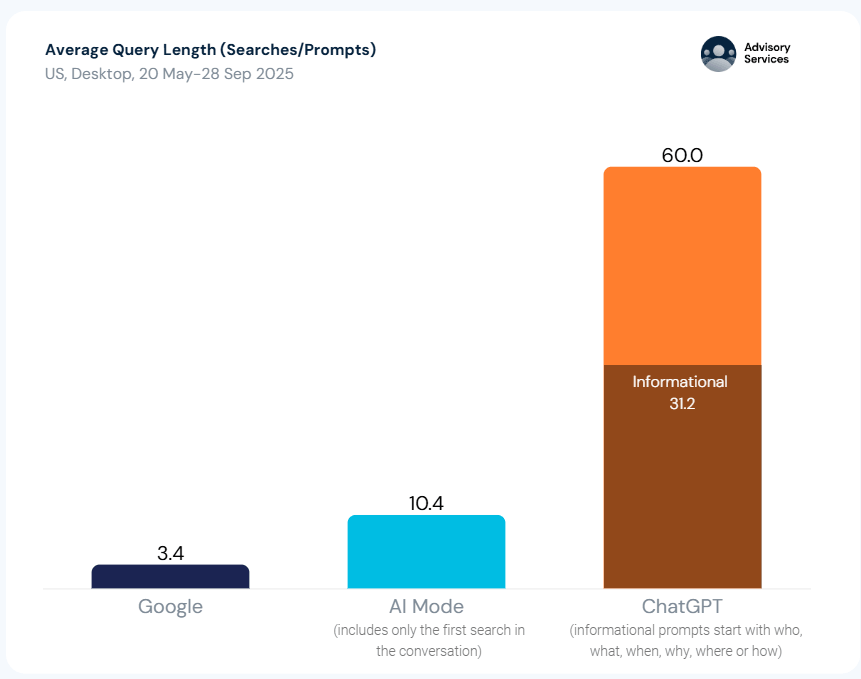
People approach AI tools the way they approach a knowledgeable colleague: with a full question, context, and an expectation of a direct answer. That behavior does not map to a keyword spreadsheet.
Prompt research is the process that does.
It is how you find the specific questions your audience is asking AI systems, where your brand should appear in those answers, and what content gaps are keeping it out.
According to Similarweb’s 2026 Generative AI Brand Visibility Index, 35% of US consumers now use AI tools at the product discovery stage, compared to 13.6% who use traditional search.
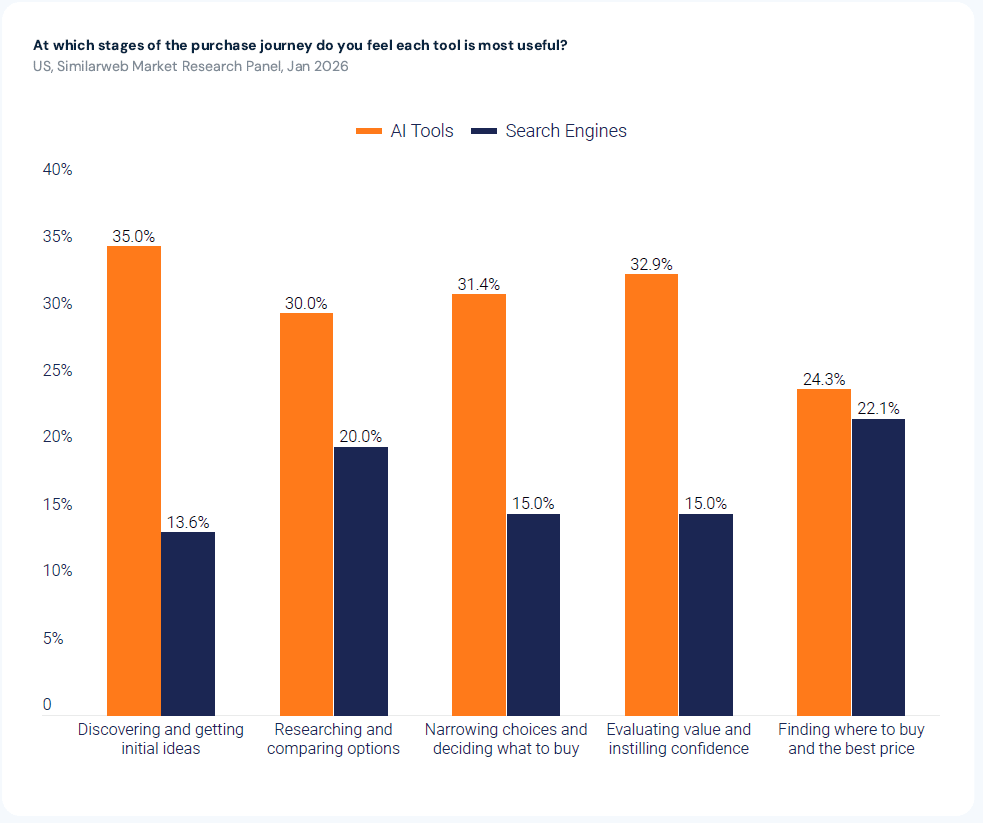
By the time most buyers open a search engine, they already have a shortlist. They built it in ChatGPT. If your content strategy is built entirely around keywords, you are optimizing for the second half of the funnel.
This guide covers:
Prompt research is the process of identifying the full, natural-language questions that users type into AI systems like ChatGPT, Perplexity, and Google AI Mode. The goal is to find which AI-answered queries matter to your brand, which ones you already appear in, and which represent gaps you can close.
Unlike keyword research, it does not start with a short search term and expand outward. It starts with the conversational questions your audience actually uses, breaks them down into the sub-queries AI systems generate, and maps where your content is eligible to be cited.
The core difference is not length. It is how much intent the query carries.
A keyword like “best CRM software” strips away almost all context. The searcher’s company size, budget, existing tools, and urgency are absent.
A prompt like “what is the best CRM for a 15-person remote sales team already using HubSpot’s marketing tools that doesn’t require a long implementation?” contains all of that context. The AI uses it to generate a specific recommendation.
A keyword tells you a topic is relevant. A prompt tells you which decision context your content needs to address.
Traditional keyword research reveals search intent at the category level. Prompt research reveals it at the individual decision level.
The two lists do not overlap as much as you might expect.
Comparison queries, constraint-heavy evaluations, persona-specific “best for” questions: these drive a lot of AI recommendations but have low or no tracked search volume in traditional keyword tools. They surface in AI platforms precisely because users trust AI to handle complex, context-rich questions that a search engine handles poorly.
If you only research what has search volume, you miss this entire tier of AI-relevant queries. Prompt research surfaces them by starting from the question structure, not from existing volume data.
Keyword research and prompt research share the same objective: improve brand discoverability. But they work differently, produce different outputs, and optimize for different metrics.
| Dimension | Keyword research | Prompt research |
| Unit of research | 2-5 word search terms | 15-25 word conversational questions |
| Data available | Volume, difficulty, CPC, trend | Limited; emerging tools tracking AI query frequency |
| Optimization target | Rank on a SERP for a specific term | Be cited in an AI-generated answer across a query cluster |
| Intent specificity | Low, inferred from the term | High, stated in the query itself |
| AI search relevance | Partial (keywords that trigger AI Overviews) | Direct (prompts that trigger full AI-generated answers) |
| Primary metric | Organic rank + impressions | AI citation frequency + brand mention rate |
| Failure mode | Ranking on page 2 | Being absent from the answer entirely |
The failure mode is where the real difference shows.
In traditional search, a page that ranks in position 9 is still visible. In AI search, if your brand is not in the answer, it is not in the conversation. There is no position 9. There is mentioned, and there is not mentioned.
The upside of being cited is significant. Seer Interactive’s analysis of 3,119 informational queries across 42 organizations found that brands cited within AI Overviews earned 35% more organic clicks and 91% more paid clicks than uncited brands on the same queries. Being in the answer is not just a visibility metric. It has a direct effect on traffic. Prompt research tells you where to earn those citations.
Pro tip: If you already have a keyword list and want to convert it into trackable prompts, see our guide on turning keyword data into prompts you can track in AI search.
My process follows five steps:
Each step produces a specific input to your content strategy.
Need a template? I got you. Download this prompt research template to have everything in one place.
An anchor query is the full, conversational question your audience would type into an AI engine when seeking a recommendation, comparison, or explanation in your category.
It is not a keyword. It is not a topic. It is a sentence, typically 15-25 words, that reflects how a real buyer phrases a complex question.
To find yours, pull from three sources:
Sales and customer success language: What questions do prospects ask in discovery calls before they understand what your product does? These tend to be in the buyer’s own vocabulary, not your internal terminology, and they map closely to how that buyer would phrase a ChatGPT query.
Support tickets and onboarding questions: These surface the friction points users hit when trying to get an outcome. They are naturally phrased in full sentences and often translate directly to AI search queries.
Direct AI experimentation: Open ChatGPT or Perplexity, enter a seed topic, and look at the search steps or follow-up suggestions the system generates. The sub-queries an LLM constructs when exploring your topic are a direct signal of how AI decomposes questions in your category.
These three sources are the same inputs that the FAN methodology for GEO keyword research uses to derive anchor queries. If you are already running fan-out mapping as part of your keyword process, those anchor queries are your starting point here.
When an AI engine receives your anchor query, it does not search for that exact phrase. It breaks it into a set of sub-queries, typically six to twenty, retrieves content to support each one, and then synthesizes an answer. This is called query fan-out.
Mapping the query fan-out space before you source prompts ensures you are covering the full scope of what AI needs to answer, not just the obvious surface question.
For every anchor query, map all seven sub-query types:
| Sub-query type | What it captures | Example for “project management tools for marketing teams” |
| Definition | What is this? Core understanding | “What is project management software?” |
| Comparison | How does it compare to alternatives? | “Asana vs Monday.com for marketing teams” |
| How-to | Step-by-step implementation | “How to set up a client reporting workflow in project management software” |
| Use case | Who uses this and how? | “Project management software for creative agencies” |
| Objection | Is it worth it? Skeptical queries | “Is project management software worth it for small teams?” |
| Entity expansion | Related tools, platforms, adjacent concepts | “Project management tools that integrate with Slack” |
| Metric | Benchmarks, data, “how many / how much” | “Average project management software adoption rate for marketing teams” |
Each sub-query type you do not cover is a branch of the AI answer where another source gets cited instead of you.
With your anchor queries and fan-out map ready, you now need the actual prompts people are using. Three sources produce the most reliable signal:
Your Google search console has been secretly collecting data on very long queries that people type into Google search, and the way to find them isn’t new, but now it’s much more relevant.
Filter your GSC query data to surface only queries ten words or longer using the following custom regex filter:
^(\S+\s){9,}\S+$
Apply this under: Performance → Search results → Add filter→ Query → Custom (regex).
I also suggest filtering the date range to at least 6 months.
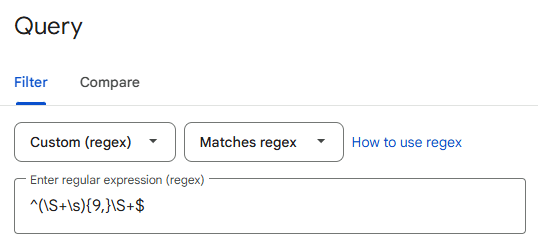
I find ten words to be a useful floor, long enough to filter out short-tail noise while capturing the conversational phrasing that tends to trigger AI Overviews and AI Mode. That said, the right threshold depends on your category and audience. Some teams find eight words work better for their data; others push to twelve or more to get only the most question-like queries. Adjust the number in the regex (the {9,} controls the minimum word count) and see what the distribution looks like in your own GSC before committing to a cutoff.
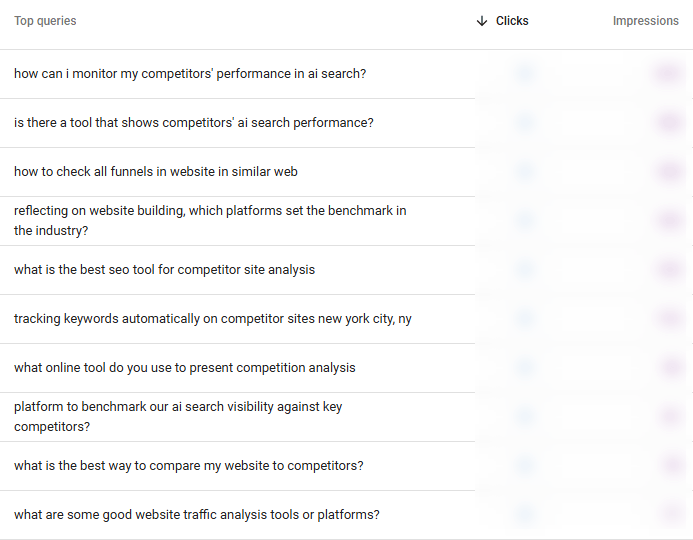
Here’s an example from our site, where you can see some good examples for prompts worth tracking:
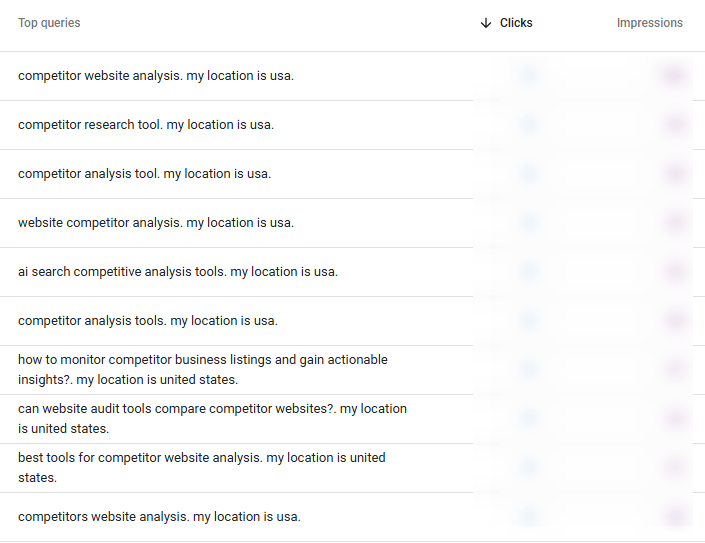
I like how this also helps surface queries that are obviously sent by various AI visibility / prompt tracking tools. You got these guys:
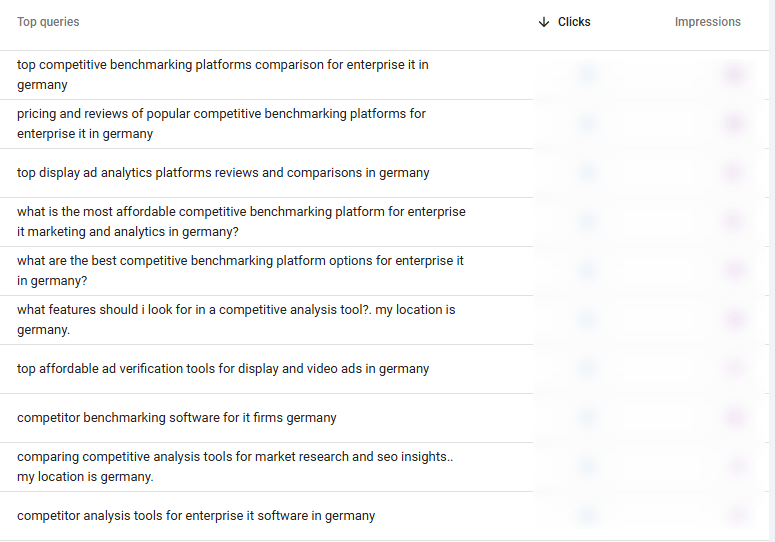
And these guys thought I wouldn’t notice, ha!
Anyway, ten-word queries are almost always phrased as a full sentence, the same conversational pattern users bring to AI tools. When Google sees a query this long and specific, it activates its generative answer layer for the same reason an AI engine would.
Your GSC data is a free, first-party signal of the conversational query patterns your current audience is already using, and a strong proxy for what they are asking in ChatGPT and Perplexity for the same topic.
Export the filtered query set, strip out branded queries, and cluster the remaining long-tail queries by topic. Each cluster becomes a candidate prompt set.
Similarweb’s AI Prompt Analysis tool surfaces real user prompts from ChatGPT, Perplexity, Gemini, and Google AI Mode based on actual data, not synthetically generated questions built from keyword templates. That distinction matters: real-user data captures the question patterns and language buyers actually use, including phrasings that would never show up in a keyword-based prompt library.
For each tracked topic, the tool shows the relevant prompts, whether your brand is mentioned in the AI-generated answer, and which sources the AI cited.
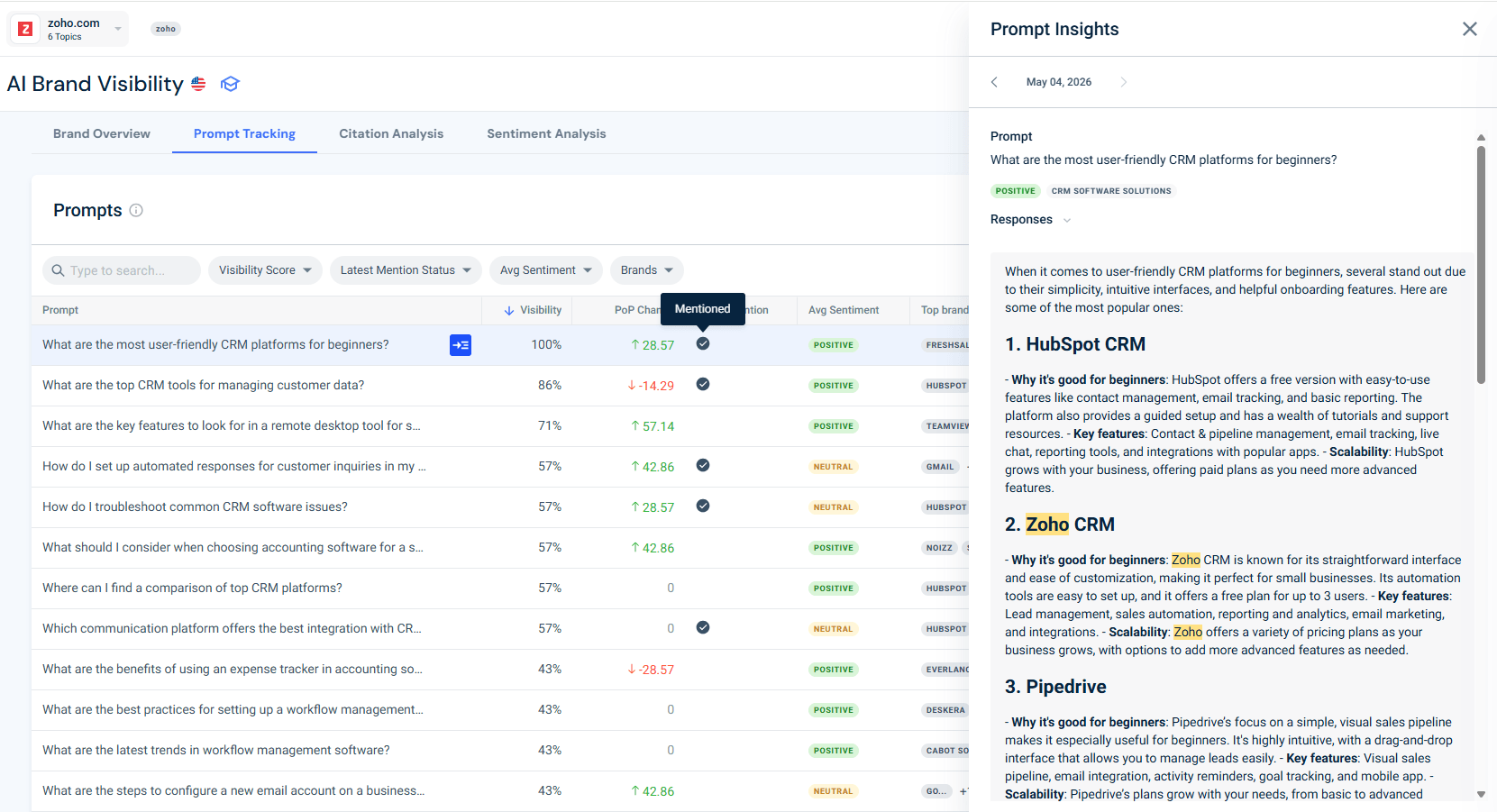
Look specifically for prompts where your brand shows as “not mentioned”. Each one is a gap: a real query, typed by real users in your category, where your brand did not appear. Those prompts are not failures to note for later. They are briefs.
Once you have a set of prompts to track, prompt tracking monitors how your mention status changes over time as you publish and optimize.
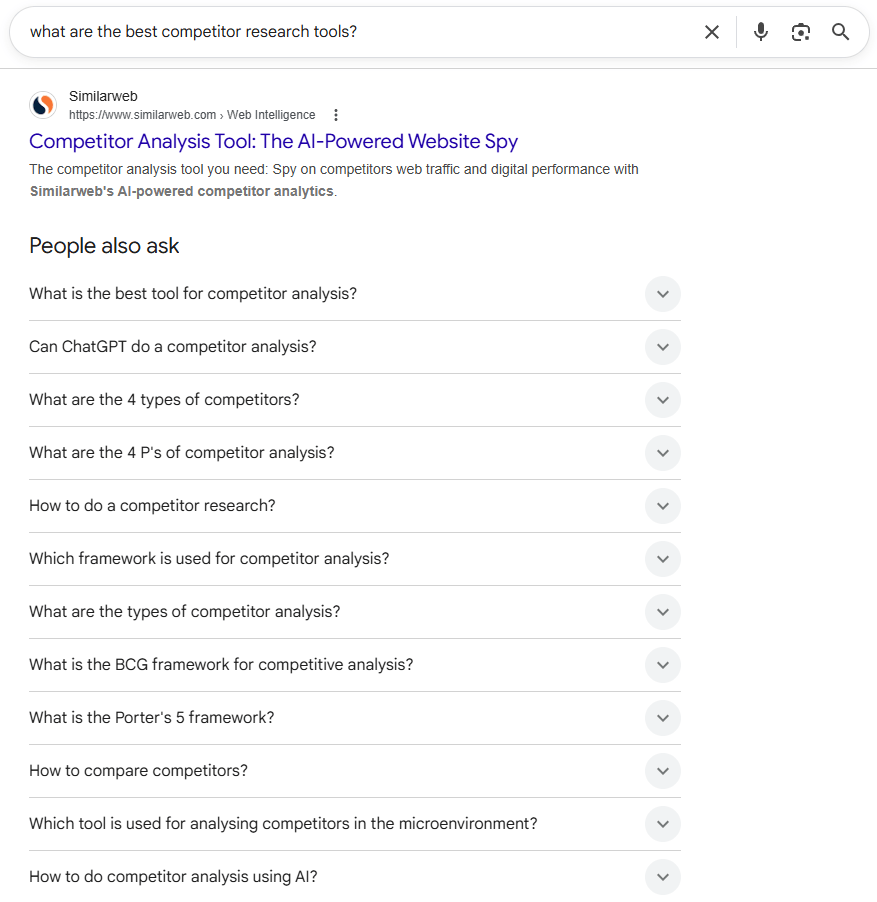
Run a People Also Ask sweep for each of your anchor queries in Google. The questions surfaced in the PAA box reflect Google’s interpretation of the adjacent intent space around your topic. Since Google’s AI Overviews and AI Mode draw from the same signals, PAA questions are reliable proxies for the sub-query types AI systems will generate.
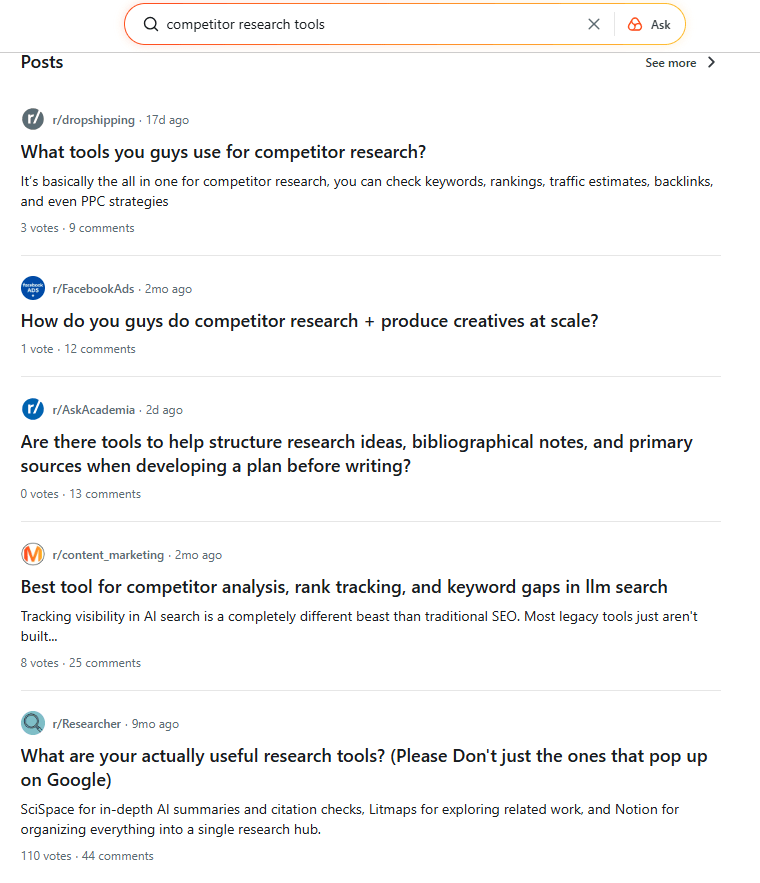
Supplement this with forum and community research. The way a buyer describes a problem in a Reddit thread (the vocabulary, the phrasing, the constraints they name) is closer to how they would prompt ChatGPT than how they would type a Google search.
Not every prompt warrants the same content treatment.
Zero-click rate, the percentage of searches that resolve without the user clicking through to any website, tells you whether to brief content for AI citation or for organic click-through.
According to Similarweb keyword research tool, “geo seo” and other related keywords carry around 70%-80% zero-click rate.
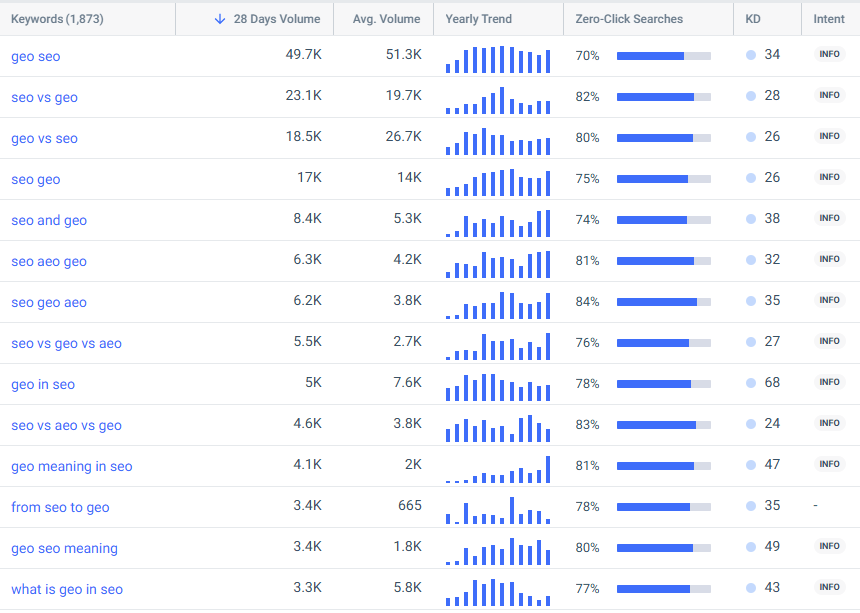
This means that no matter how much we invested in our guide that compares SEO to GEO, we’re probably not gonna see a lot of clicks from it. Since we’re probably not gonna get clicks for ranking well on these keywords, these are citation plays: AI is already answering these queries, and the only way to capture value is to be the source it cites.
| Zero-click rate | Strategic implication | How to brief it |
| Below 30% | Click opportunity | Optimize for CTR; clear value prop in title; compelling reason to click |
| 30-50% | Mixed | Optimize for both citation quality and CTR |
| 50-70% | Citation play | Brief for BLUF structure, data density, citation-worthy statistics |
| Above 70% | Pure citation play | Brief entirely for AI mention frequency; organic traffic is secondary |
Organize your validated prompt set by where each prompt sits in the buyer journey.
Understanding how prompts map to intent helps here. Informational prompts (“what is prompt research?”) sit at the top of the SEO funnel and drive awareness and citation visibility. Comparison and evaluation prompts (“what is the best GEO keyword research tool for an enterprise team?”) sit at the middle and bottom, where AI recommendations directly influence purchasing decisions.
For most content teams, the highest-value starting point is the middle-funnel comparison and constraint-heavy prompts. These are where AI systems actively weigh alternatives and recommend specific brands. They are also where visibility gaps are most directly tied to lost consideration.
Prompt research results are measured through four metrics: AI citation frequency, brand mention rate, fan-out coverage score, and share of voice in AI.
These replace click-based tracking for queries where zero-click rates exceed 50%, because clicks are not being generated. AI answers are.
Similarweb’s AI Search Intelligence suite, specifically the AI Brand Visibility module and the Prompt Tracking module, provides all four at the prompt level with daily data refresh. For a complete GEO measurement framework covering how these metrics connect to business outcomes, see the GEO KPIs guide.
| KPI | What it measures | Similarweb module | How to read it |
| AI citation frequency | How often your content is cited in LLM responses for tracked prompts | Prompt Tracking | Rising = content is being retrieved; flat = coverage or authority gap |
| Brand mention rate | % of tracked prompts where your brand appears in the AI answer | AI Visibility | Benchmark against competitors tracking the same topic cluster |
| Fan-out coverage score | % of the 7 sub-query types with indexed, retrievable content | Manual audit against the fan-out map | Target: 7/7 covered; each uncovered type is a brief |
| Share of voice in AI | Your brand mentions divided by total AI answers in the tracked set | AI Visibility | Primary competitive health metric; shows whether you are gaining or ceding ground |
The AI Brand Visibility tool shows brand visibility percentage and topic-level mention share across ChatGPT, Perplexity, Google AI Mode, and Gemini.
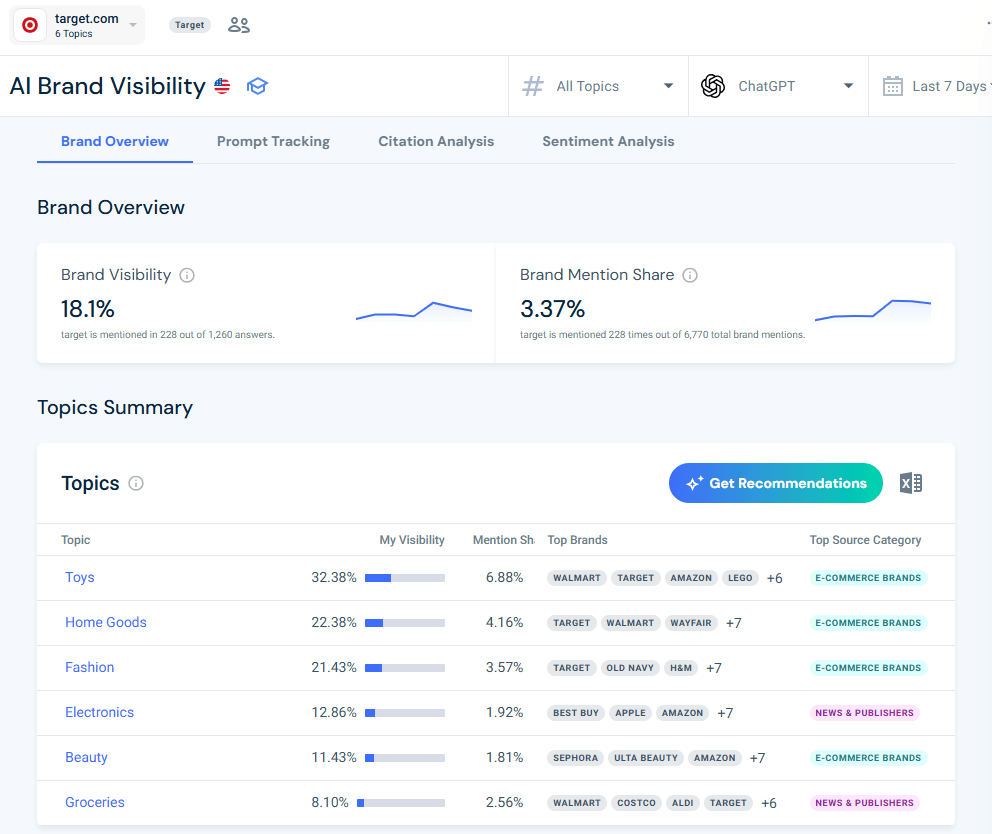
Set your baseline before new content goes live. Before publishing, record your current visibility score for the prompt cluster you are targeting, then check it again at the 30-day mark.
The data refreshes daily, so you can detect meaningful changes within weeks rather than waiting for quarterly reporting cycles. Use the topic-level breakdown to identify where visibility is concentrated and where it is absent. A brand with 40% visibility in one topic cluster and 3% in an adjacent one has a content gap, not a general authority problem.
The AI Prompt Tracking tool lets you track specific prompts daily and monitor mention status over time.
When you set up a campaign, the starting point is entering your domain. Because Similarweb holds extensive data on websites and brands, the platform already knows what your brand is best known for. It uses that to suggest relevant topics and pull relevant prompts automatically.
Here are the suggestions for a campaign I opened for Target.com:
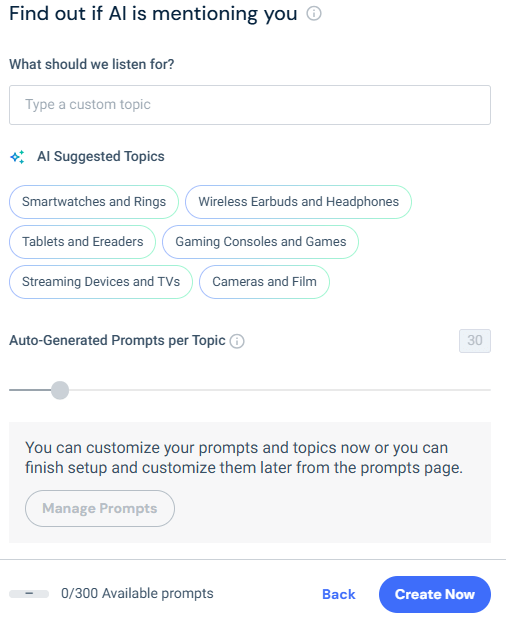
You can accept the suggestions as a starting point, refine them to match your priorities, or replace them entirely with your own. The goal is to get you tracking something meaningful quickly, without requiring you to build a prompt set from scratch.
As you saw earlier, I ended up going for more straightforward categories, such as Toys, Home Goods, Fashion, etc. Here are some examples of the prompts the platform came up with, and is now tracking:
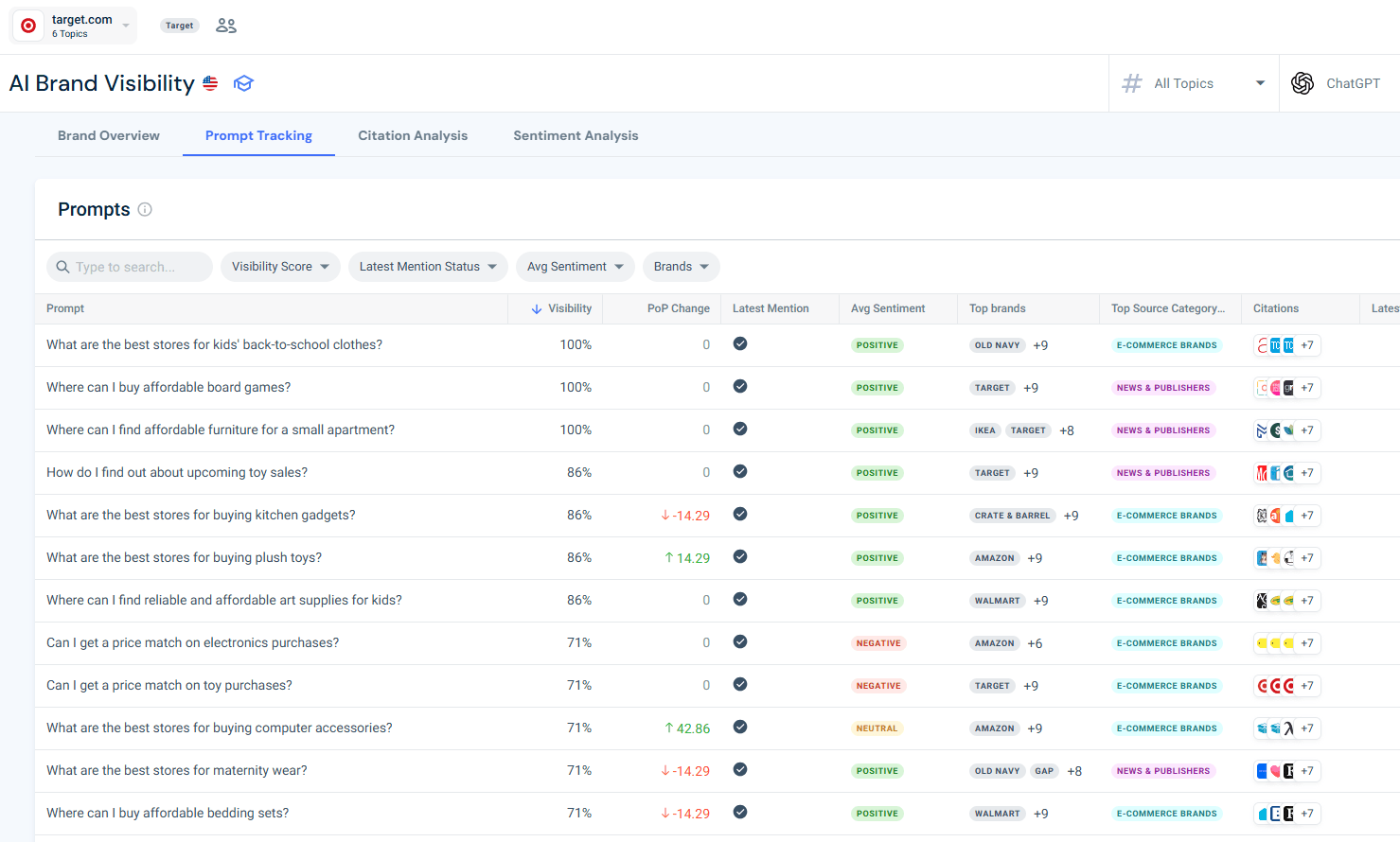
Each campaign supports up to 300 prompts, organized into topics. There is no hard cap on the number of topics, which means you can mirror your fan-out map directly: one topic per anchor query, with sub-query prompts nested underneath.
If you want, you can also add prompts manually one by one or upload a CSV for bulk import (useful when seeding from a large GSC long-tail export or a full fan-out map). You can reassign prompts between topics as your content strategy evolves.
The most actionable view is the mention status change log. Prompts that move from “not mentioned” to “mentioned” after you publish or update content are direct evidence that the content change worked. Prompts that stay “not mentioned” despite published content point to a topical authority or citation gap rather than a content gap, which requires a different fix: third-party mentions, off-site citations, or content restructuring for better extractability.
Prompt research takes upfront time: mapping anchor queries, running fan-out mapping, pulling from three data sources, and validating against zero-click rate.
It produces two things that keyword research cannot.
First, a map of AI-answered queries your audience is using right now. Second, a clear framework for deciding which of those queries to brief for citation optimization versus click-through.
For brands where the discovery funnel runs through AI, skipping it means making content decisions without data on the channel that is growing fastest.
The scale of that channel is no longer speculative. According to Similarweb’s 2026 Generative AI Brand Visibility Index, AI tools now hold a 2:1 advantage over traditional search at every stage of the purchase funnel from discovery through evaluation. By the time users reach the final step of finding where to buy, AI and search reach near parity (24.3% vs. 22.1%). Buyers are using AI to build their consideration set and search to confirm what they have already decided.
When an AI summary appears in Google search results, click-through rates drop from 15% to 8% (Pew Research Center, July 2025). Users resolve their questions within the AI answer. The ones who do not click are still forming impressions, comparing brands, and building preferences, just without ever visiting your site.
Prompt research is how you find which conversations those impressions are happening in, and whether your brand is part of them.
Keyword research gives you a map of where your audience searched. Prompt research gives you a map of where they are asking questions now, and those two maps have less and less in common.
The research process is the same in principle: identify what people want to know, find the gap between what exists and what is needed, and provide content that fills it. What changes is the unit of research (questions, not keywords), the data sources (GSC long-tail regex, Prompt Analysis, AI experimentation), and the success metric (citation frequency and mention rate, not rank and CTR).
Brands that know which prompts trigger AI recommendations in their category will have already decided their content strategy before competitors have started their research.
Track how your brand appears in AI-generated answers, and find the prompts where it does not, with Similarweb’s AI Search Intelligence.
Does prompt research replace keyword research?
No. They serve different purposes and work best together. Keyword research tells you what people are searching for in traditional engines, where volume, difficulty, and CPC data exist. Prompt research tells you what they are asking AI tools, where that data largely does not exist yet. Most teams find that keyword research feeds prompt research: the topics and language you identify in keyword tools become starting points for building anchor queries and validating fan-out coverage. Neither process makes the other obsolete. The question is whether you are only running one of them.
Can I do prompt research without any paid tools?
Yes, though with limitations. Google Search Console with the long-tail regex filter (Source 1 in Step 3) is entirely free and surfaces conversational query patterns from your existing audience. People Also Ask sweeps cost nothing. The gap is on the AI side: without a tool like Similarweb’s Prompt Analysis, you cannot see real user prompts from ChatGPT or other AI chatbots, and you cannot track mention status changes over time. For teams starting, the GSC method plus manual PAA research produces a workable first prompt set. Add the tool layer once you need scale or competitive benchmarking.
How do I know if my content is being cited in AI answers?
The most direct method is Similarweb’s Prompt Tracking module, which monitors daily whether your brand is mentioned in AI-generated answers for each tracked prompt. For a manual check, enter your target prompts directly into ChatGPT, Perplexity, Gemini, and Google AI Mode, and look for citations to your domain in the response. Note that AI answers are personalized and vary by session, so a single manual check is a directional signal, not a reliable audit. Consistent tracking across a prompt set over time is the only way to get statistically meaningful visibility data.
What makes a prompt worth tracking versus one that is not?
A prompt is worth tracking if it reflects a real decision a buyer in your category would make, and if your brand could credibly appear in the AI answer. The strongest candidates are mid-funnel comparison and evaluation prompts, queries that name specific constraints (budget, company size, existing tools), and prompts where a competitor is currently being cited but you are not. Prompts to deprioritize include purely informational questions with no recommendation component, queries where your product is genuinely not a fit, and minor wording variations of prompts you are already tracking, since these tend to produce identical AI behavior without adding new signal.
How many prompts should I track?
Similarweb’s Prompt Tracking supports up to 300 prompts per campaign. Most teams find stable patterns well before that ceiling: 50-150 prompts per topic cluster is typically enough to surface meaningful signals. A practical starting point is 10-15 decision-stage prompts per major product area, covering at least three of the seven fan-out sub-query types. Expand from there as patterns emerge. Tracking 200+ prompts does not proportionally improve signal quality; the incremental value diminishes significantly above 150 per cluster.
How often should I update my prompt research?
Run a prompt-level gap review monthly and a full fan-out map refresh quarterly. AI platforms update frequently, competitive citation dynamics change, and new prompt patterns emerge as audience behavior evolves. Monthly reviews let you detect mention status changes quickly enough to act before gaps widen. Prompt patterns for a given topic typically stabilize after 60-90 days of tracking, so the first three months of data are the most volatile and the most important to monitor closely.
Senior SEO Specialist
Shai, with 10+ years in SEO, holds a Bachelor’s and an MBA. He enjoys TV shows, anime, movies, music, and cooking.
Give it a try or talk to our insights team — don’t worry, it’s free!