What is RAG (Retrieval-Augmented Generation)? A Marketer's Guide
by Shai Belinsky9 Min.
Oct 01, 2026
For the past two years, we’ve been working on AI search measurement at Similarweb. We’ve built AI visibility tracking across ChatGPT, Perplexity, and other platforms. We’ve helped publishers understand their citation patterns and competitive positioning.
But there’s been a gap: no search engine was providing first-party data on how their own AI systems cite content.
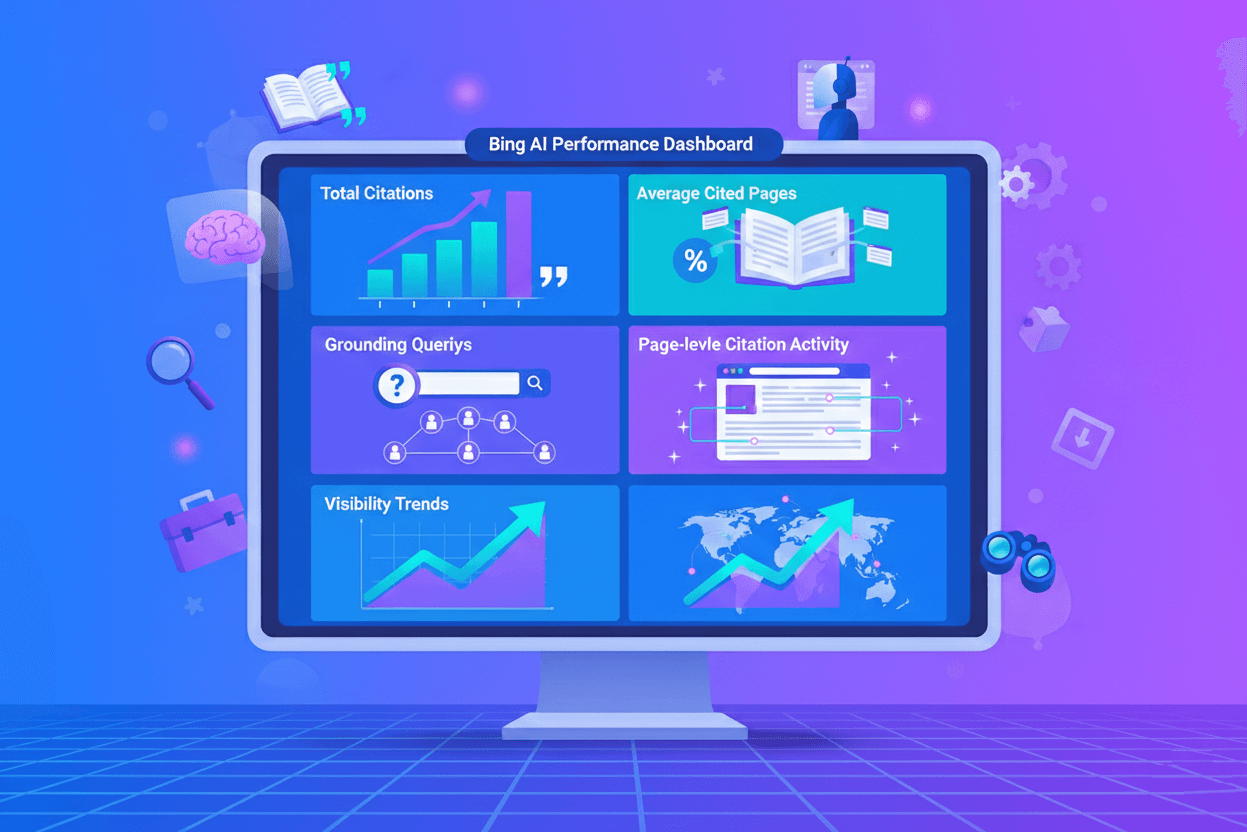
On February 10, 2026, Microsoft changed that. They launched the AI Performance dashboard in Bing Webmaster Tools. The first time any major search platform has given publishers direct, first-party data on how AI systems cite their content.
While Google continues to treat AI Overviews as just another impression type buried in Search Console’s standard performance reporting, Microsoft has built a dedicated dashboard specifically for AI citation tracking.
It represents a fundamental shift: search engines are finally acknowledging that AI visibility needs its own measurement infrastructure.
Yes, Bing has a single-digit market share. Yes, most of your traffic probably comes from Google. And yes, you should still pay attention to this, because Microsoft is providing first-party citation data that the industry has needed.
This isn’t just about Bing citations. It’s about having first-party, quantifiable data directly from a search engine instead of relying solely on third-party measurement.
In this guide, I’ll walk you through everything: what Microsoft launched, what the metrics actually mean, and six practical ways to use this data for GEO.
Let’s get into it.
On February 10, 2026, Microsoft officially launched AI Performance as a public preview feature in Bing Webmaster Tools. According to the product managers behind the release, this represents “an early step toward Generative Engine Optimization tooling in Bing Webmaster Tools.”
The dashboard tracks citation activity across Microsoft Copilot, AI-generated summaries in Bing, and select partner integrations. Using it, publishers can see how often their content is referenced in generative answers, which URLs are cited, and how citation activity changes over time.
Microsoft is framing this as an extension of traditional webmaster tools (indexing, crawl health, and search performance) into the new world of AI-generated answers.
They’re acknowledging the change: visibility isn’t only about blue links anymore. It’s also about whether AI systems reference you when generating answers.
For a deeper understanding of how GEO differs from traditional SEO and why both disciplines matter, see our comparison guide.
The competitive context makes this launch significant:
The AI Performance dashboard provides five distinct data views. Understanding what each metric actually measures (and what it doesn’t) is important for using the data effectively.
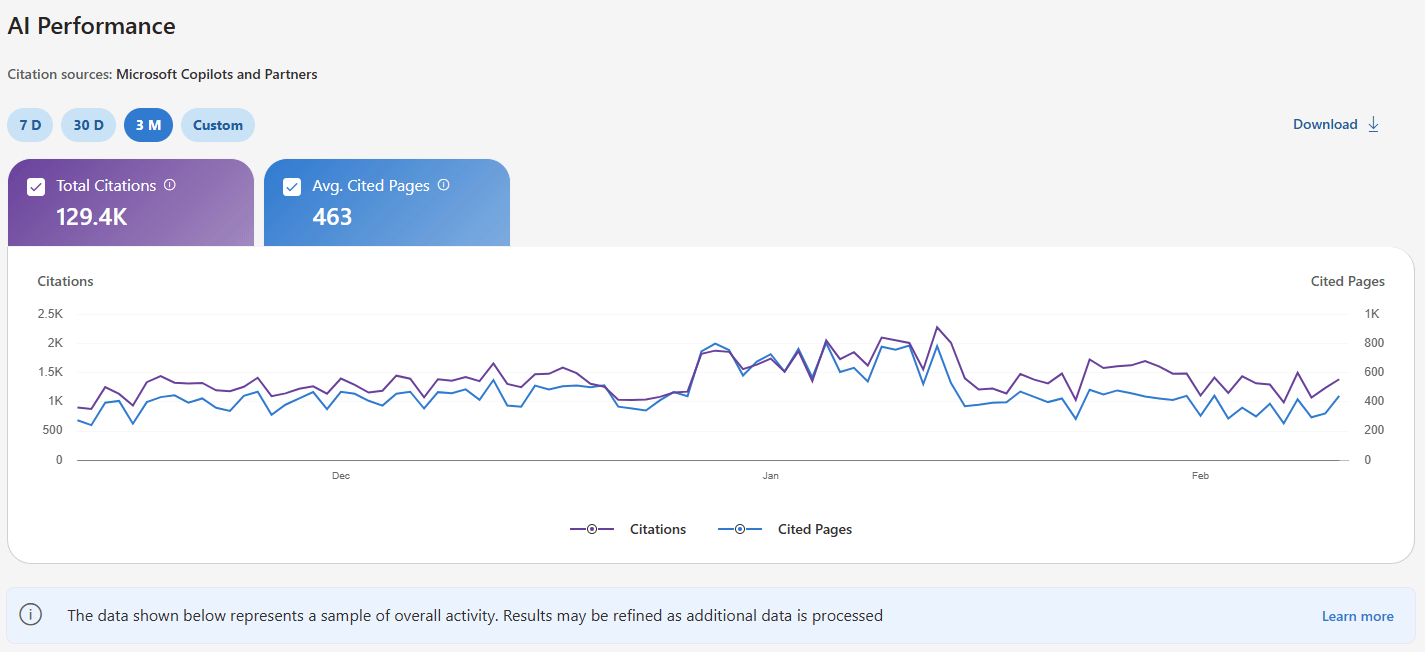
Definition: The total number of times your site appears as a source in AI-generated answers during the selected timeframe.
What it measures: Citation frequency. How often do AI systems across Microsoft’s ecosystem reference your content when generating answers?
What it DOESN’T measure: Placement position, prominence within specific answers, or the contribution quality of your citation. Being cited as “the definitive guide according to [YourSite]” counts the same as being listed as reference #12 in a footnote.
Example interpretation: If you have 2,450 citations in February 2026, it means your content was used as source material 2,450 times across Copilot, Bing Chat, and partner integrations.
Strategic value: This is your primary GEO KPI in Bing for tracking the overall AI visibility trend. Month-over-month changes in total citations indicate whether your efforts are working.
Critical limitation: All citations are weighted equally. The metric treats a primary source citation the same as a supplementary mention buried at the bottom of a response.
Definition: The daily average number of unique URLs from your site that are displayed as sources in AI-generated answers over the selected time range.
Data aggregation: This metric combines data across all supported AI surfaces-Copilot, Bing Chat, and partner integrations.
What it measures: Citation diversity across your content. A high number indicates AI systems are drawing from many different pages on your site. A low number suggests concentrated authority in a few URLs.
What it DOESN’T measure: Ranking, authority within your niche (domain influence), or the role of any page within an individual answer.
Example interpretation: An average of 23 cited pages per day means AI systems are pulling from 23 unique URLs daily when generating answers.
Strategic value: This metric shows whether your AI visibility is concentrated or distributed. A site with 2,000 citations but only 5 average cited pages has a dependency problem-lose those 5 pages, and you lose all AI visibility. A site with 2,000 citations and 80 average cited pages has built broader topical authority.
Red flag signal: Low average cited pages, combined with high total citations, indicates over-reliance on a few cornerstone pieces of content. If those pages become outdated or competitors overtake them, your entire AI visibility collapses.
Definition: The key phrases AI systems use when retrieving content that was referenced in AI-generated answers.
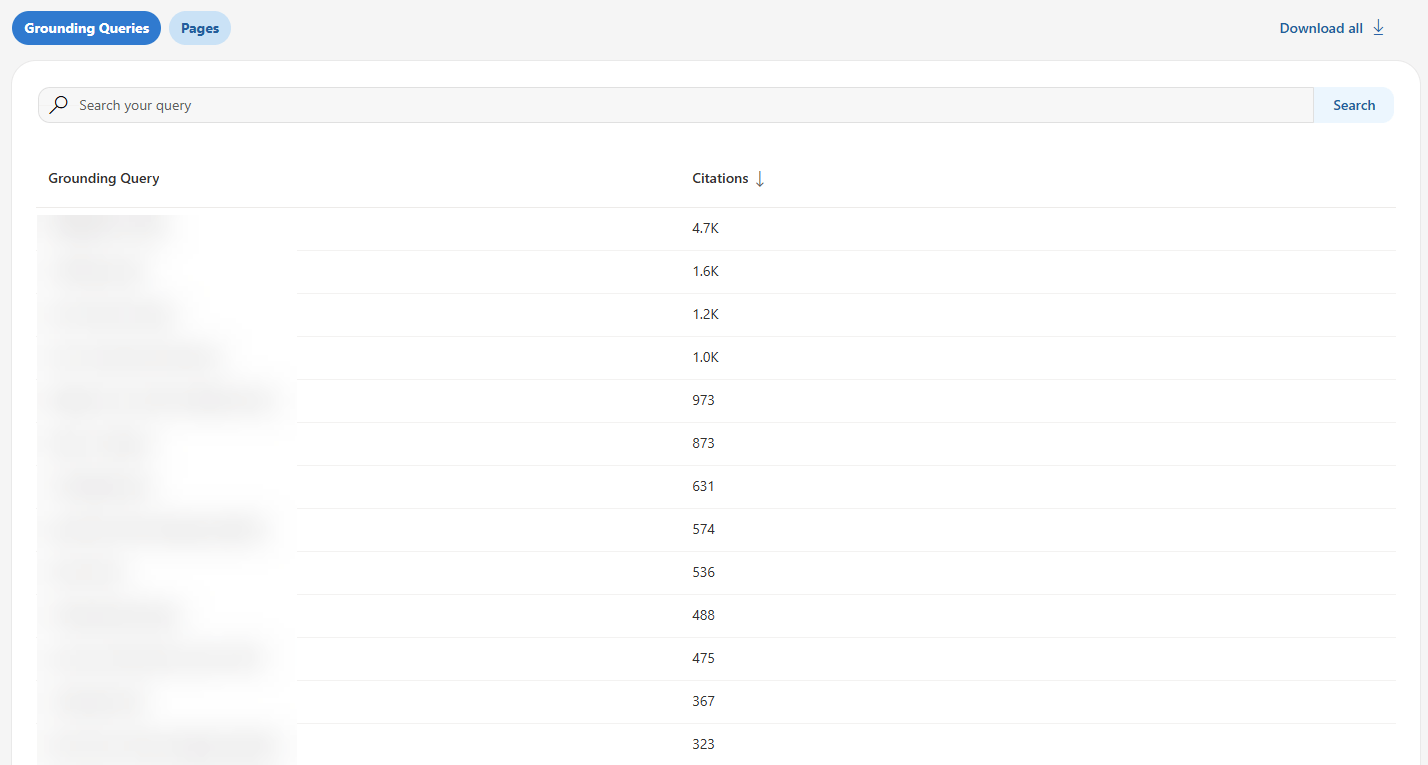
CRITICAL CLARIFICATION: These are NOT user search queries or prompts.
This is one of the most misunderstood aspects of the dashboard: Grounding queries represent the internal retrieval phrases AI systems use to find your content, not the questions users actually asked.
Think of it this way: A user asks Copilot, “How do I secure my company’s API?” The AI system might then use internal retrieval queries like “API security best practices enterprise” or “OAuth implementation authentication” to find relevant content. Those internal queries are what you see in grounding queries.
Data limitation: Microsoft explicitly states this represents “a sample of overall citation activity.” They haven’t disclosed what percentage of grounding queries are shown or how the sample is selected. The product team notes they “will continue to refine this metric as additional data is processed.”
Example: If grounding queries show “OAuth implementation enterprise microservices,” the AI system used that phrase internally to retrieve your content, even if the user’s actual question was phrased completely differently.
Strategic value: Grounding queries reveal what AI systems think your content is topically about. They show you the AI’s perspective on your content positioning, which may differ significantly from your intended target audience.
User confusion point: SEOs can assume these are actual user queries and start optimizing for them directly. That’s not quite right. These are AI’s internal assessments of your content’s relevance, which are valuable but distinct from keyword targeting.
Definition: Citation counts for specific URLs from your site during the selected date range across all AI-generated answers.
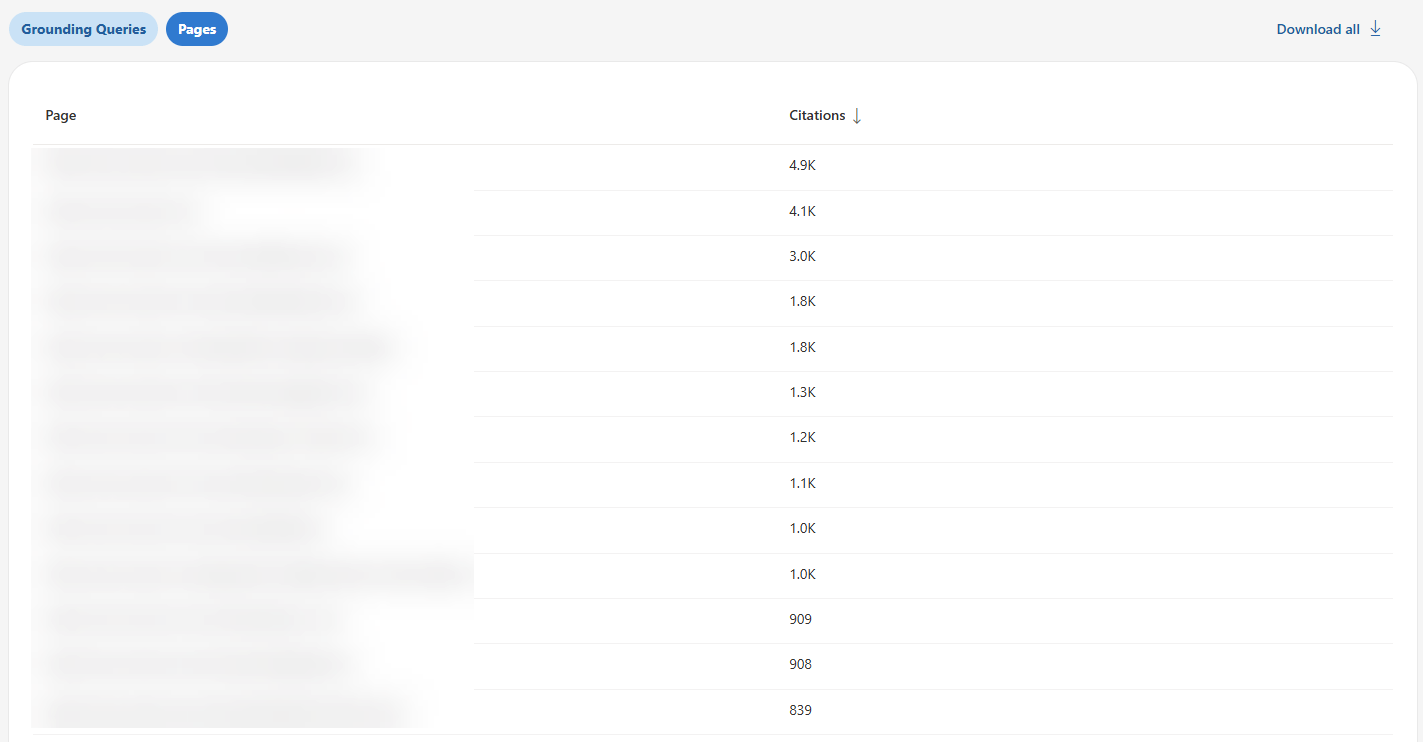
What it measures: Which individual pages AI systems reference most frequently. This is actionable data-you can see exactly which URLs are performing in AI citations and which aren’t.
What it DOESN’T measure: Page importance in absolute terms, competitive ranking, or placement within answers. A page with 347 citations might be dominating your niche or might be middle-of-the-pack compared to competitors-the dashboard doesn’t tell you which.
Example: Your /api-security-guide page shows 347 citations; your /oauth-tutorial page shows 189 citations, and your /authentication-methods page shows 67 citations. You now know which content AI systems consider most citation-worthy.
Strategic value: Identify your highest-performing content for AI systems, then reverse-engineer what makes those pages successful. Common patterns across top-cited pages reveal your “GEO content DNA” (the structural elements, content depth, and formatting that AI systems prefer from your site).
Optimization path: Pages with high historical citations but declining trends need immediate attention. Pages with zero citations despite being indexed are optimization opportunities.
Definition: A timeline showing how citation activity for your site changes over time across supported AI experiences.
Visualization: The dashboard displays trend lines, making it easy to spot patterns at a glance: upward trends (growing AI visibility), flat trends (stable performance), or downward trends (declining citations).
Strategic value: Trend data helps you identify the impact of optimization efforts, spot content decay, correlate citation changes with major content updates, and detect competitive displacement events.
Example use: You notice citations dropped 40% over six weeks starting in mid-January. Analysis reveals that a competitor published a comprehensive guide that overtook your content. Time to update and enhance your coverage.
Historical data limitation: As a public preview feature, you have limited baseline data, 30-90 days maximum initially. True trend analysis requires 12-18 months of historical data on AI, which won’t be available for some time.
This, for the first time in many years, gives Bing an advantage over Google’s Search Console. They are the first search engine to break the AI data boundary and provide users with what they have been asking for in the past 2 years.
Here’s a short analysis of how Bing stacks up vs. Google Search Console (SEOs’ favorite), strictly in terms of features:
| Feature | Bing AI Performance | Google Search Console |
|---|---|---|
| Dedicated AI dashboard | ✅ Yes – separate section | ❌ No – mixed with standard performance |
| Citation-style tracking | ✅ Yes – counts by URL | ❌ No – only impressions/clicks |
| Grounding queries | ✅ Yes – sample provided | ❌ No |
| Page-level AI metrics | ✅ Yes – citations per URL | ⚠️ Limited – AI impressions aggregated |
| Trend visualization | ✅ Yes – dedicated timeline | ⚠️ Partial – within standard reports |
| AI surfaces covered | Microsoft ecosystem only | Google AI Overviews only |
| Click data from AI | ❌ No | ✅ Yes – AI Overview clicks tracked |
| API access | ❌ Not yet | ✅ Yes – via standard API |
Bing offers AI citation metrics (more GEO-oriented). Google offers AI overviews, impressions (AEO-oriented), and traffic attribution, but no AI-specific metrics. Neither gives you the complete picture.
Now it’s time to take Bing Webmaster Tools’ new dashboard for a ride. Let’s get started:
Access the AI Performance dashboard at bing.com/webmasters/aiperformance (requires verified site ownership in Bing Webmaster Tools).
The dashboard shows 30 days of data by default with adjustable ranges. During public preview, historical data is limited to 30-90 days.
Note: Bing respects robots.txt preferences, so any blocked content won’t appear in citation data.
Now that you understand what the tool does, let’s get into the tactical applications. These are concrete, actionable ways to use AI Performance data for GEO.
What Bing shows: Page-level citation counts showing which URLs Microsoft’s AI systems reference most frequently.
Review your top-cited pages to see which content Copilot and Bing Chat prefer.
Quick pattern analysis: Look at your top 10-20 cited pages. Do they share common elements?
Example:
Top 5 cited pages:
Pattern identified: Security-focused technical guides with implementation examples perform well. All 5 pages include code samples and comparison tables.
Actionable insight: Replicate this pattern. When creating new content, prioritize technical implementation guides with code examples and comparison tables (these formats are supported by Bing’s AI systems).
The limitation: You see patterns in what BING cites, with zero competitive context. You don’t know if these patterns work across all AI platforms or just Microsoft’s systems.
What makes this unique: Grounding queries are exclusive to Bing. No other AI platform reveals its internal retrieval phrases. This is genuinely valuable Microsoft-specific insight.
What to do: Use grounding queries to discover what AI systems THINK your content is about (which may differ from what you intended).
Export all grounding queries from your AI Performance dashboard. Categorize each into one of three buckets:
Expected (queries you intentionally optimized for):
Unexpected (queries AI found you relevant for):
Missing (related queries where you DON’T appear):
These represent opportunity. AI systems found your content relevant for queries you didn’t optimize for.
This reveals:
If you target “API security best practices” across 10 pages, but it never appears in grounding queries, AI systems don’t associate you with that topic despite your efforts.
This reveals:
Caveat reminder: Grounding queries are sampled, not comprehensive. Don’t over-index on absence-a missing query doesn’t definitively mean you’re not cited for it. But patterns across multiple related missing queries indicate genuine gaps.
Advanced application: Track grounding queries month-over-month to identify emerging topics early. New grounding queries appearing in your data represent trending topics where AI systems are starting to cite you-capitalize on these early signals before competitors do.
What Bing shows: Citation volume over time for Microsoft platforms.
Use the visibility trends chart to spot pages gaining or losing citations in Copilot and Bing Chat.
What to do: Use the visibility trends over time to identify pages losing AI citation momentum, then prioritize them for updates.
Not all citation declines deserve immediate attention. A page dropping from 5 citations to 3 citations isn’t urgent. A page dropping from 145 citations to 34 citations is screaming for intervention.
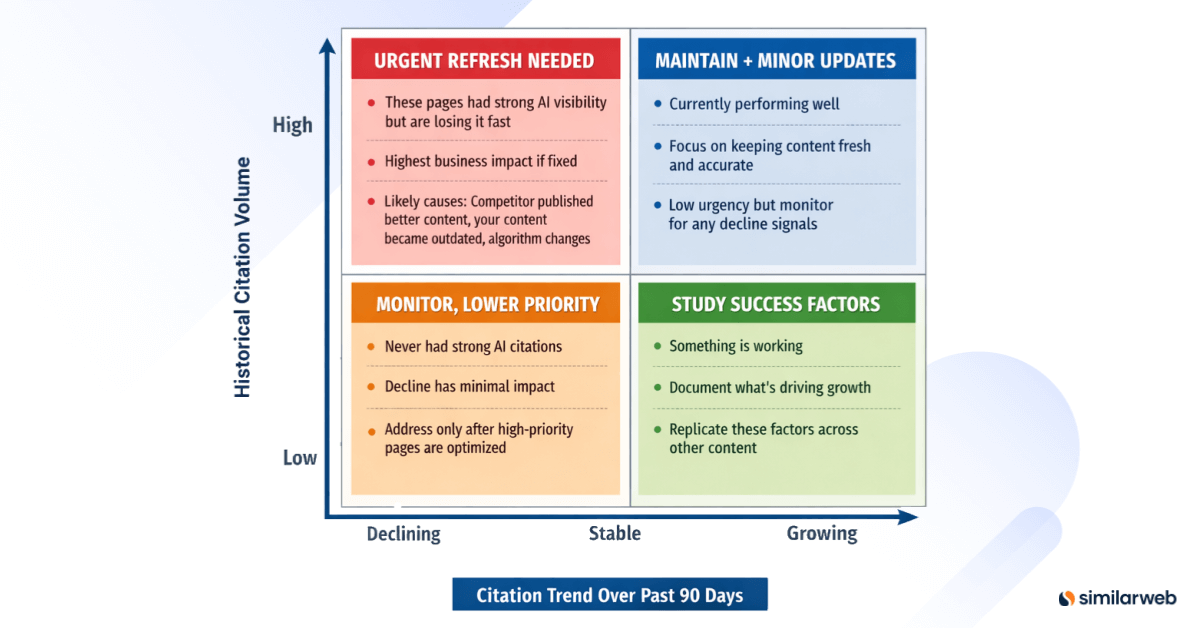
Create a 2×2 matrix: – Y-axis: Historical citation volume (High, Medium, Low) – X-axis: Citation trend over past 90 days (Declining, Stable, Growing)
Track citation counts weekly over an 8-12 week rolling window. Calculate citation velocity:
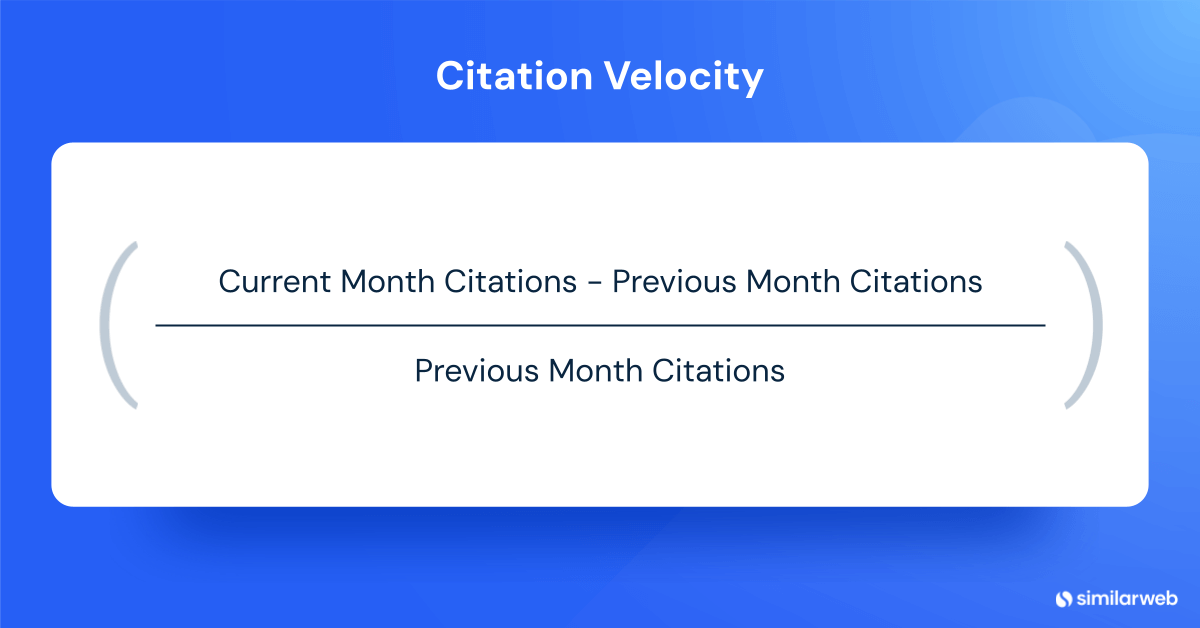
Citation Velocity = (Current Month Citations – Previous Month Citations) / Previous Month Citations
Flag pages with negative velocity greater than 15% as “citation decay.”
December: 145 citations
January: 89 citations (-39% vs. Dec)
February: 34 citations (-62% vs. Jan)
Overall trend: -77% decline over 3 months
Priority: URGENT – High historical volume with severe decline
Potential causes for investigation:
Success metrics: Citation recovery to 80%+ of peak within 8 weeks of refresh indicates successful optimization.
What Bing shows: Page-level citation data revealing which indexed pages get zero citations from Microsoft’s AI systems.
Compare Bing’s cited pages against your indexed pages to identify content Microsoft AI ignores.
Simple check:
Example: You have 347 indexed pages, but only 52 show citation activity in Bing = 295 pages that Microsoft’s AI systems ignore.
Common reasons for zero citations:
Quick diagnosis: Pick 5 zero-citation pages and check:
The limitation: This only shows which pages BING doesn’t cite. Massive blind spots:
Optimization priority: Start with high-traffic zero-citation pages. If a page gets 5,000 monthly organic visits but has zero AI citations, it shows strong topic relevance but lacks a citation-worthy structure. These pages offer the fastest optimization wins.
Action plan: Don’t create new content until you’ve optimized existing indexed but not cited pages. Adding structure to existing content is faster than building new authority from scratch.
Bing’s AI Performance tool is a genuine breakthrough. It is the first time a major search engine has provided publishers with dedicated AI performance analytics.
However, it’s incomplete by design. These aren’t minor omissions. There are fundamental gaps that prevent you from measuring whether AI visibility actually matters for your business.
Let me be specific about what’s missing and how Similarweb fills these gaps.
I’m not being promotional here – I’m being practical. At Similarweb, we built these capabilities specifically because SEOs kept asking us questions that Bing’s data simply can’t answer.
The problem: Bing shows you citations but not the downstream traffic, conversions, or revenue those citations generate.
You’ll see that AI systems cited you 2,450 times last month. Great. But how many people actually clicked through to your site? How many converted? How much revenue did AI citations drive? Bing doesn’t tell you.
Why this matters: Citations are a visibility metric, not a business outcome.
I’ve sat through this conversation more times than I’d like to admit:
Without traffic and conversion data, you can’t prove ROI. You can’t prioritize GEO investments against other marketing initiatives. You can’t even determine if AI citations have business value at all.
For a complete guide on measuring and increasing AI-driven traffic, see our article on getting traffic from AI.
Similarweb provides traffic attribution from AI engines (actual visit data from ChatGPT, Perplexity, Gemini, and yes, Copilot). You’ll see:
For example, here’s the AI traffic trend to microsoft.com:
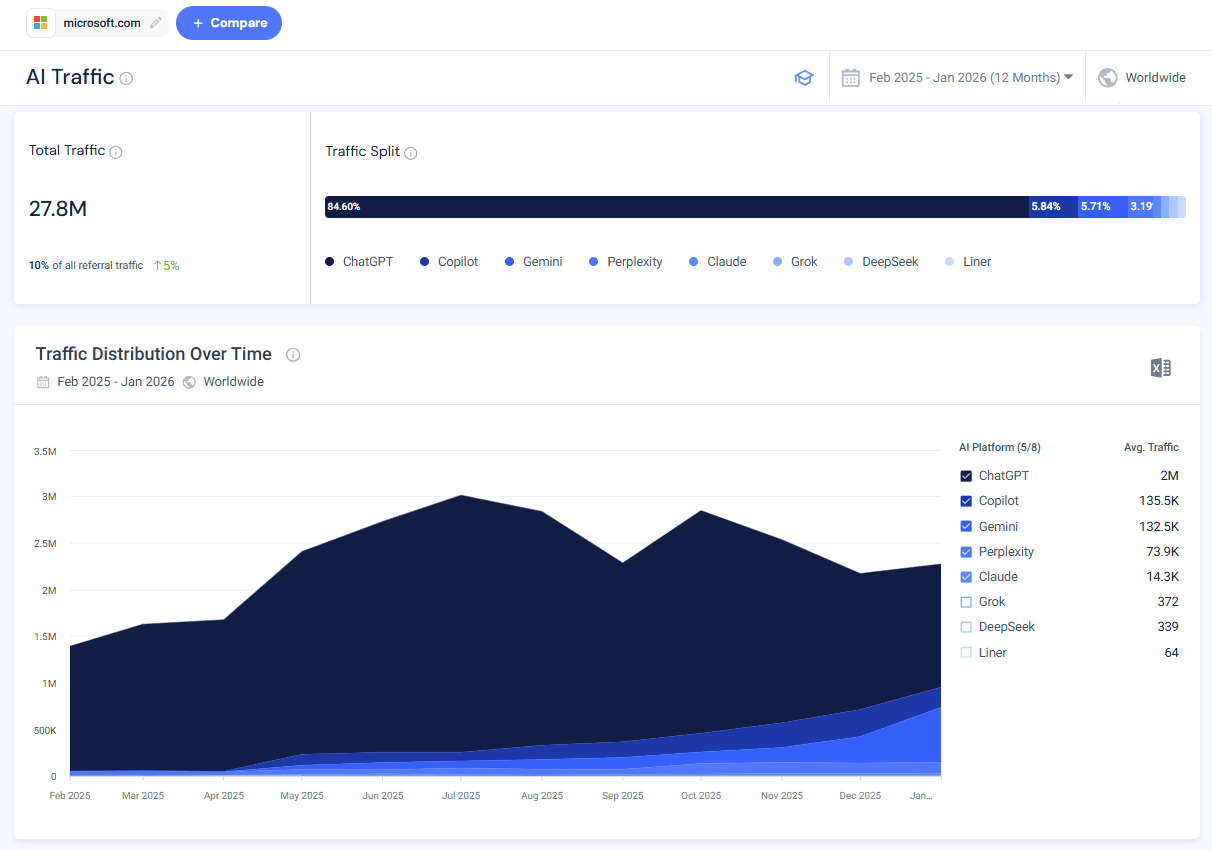
Insight: Your Bing citations represent about 6% of your total AI-referred traffic. ChatGPT drives 11x more traffic despite not being tracked in Bing AI Performance. You’re optimizing for the wrong platform.
With Similarweb’s traffic data, you can:
The complete picture requires: Mentions + Citations + Traffic + Conversions
The problem: Bing AI Performance only tracks Microsoft’s ecosystem-Copilot, Bing Chat, and unnamed “select partners.”
What’s missing?
Pretty much everything else:
Why this matters: Microsoft’s AI market share is in the single digits. By focusing only on Bing’s ecosystem, you’re measuring a small minority of the total AI visibility opportunity.
According to Similarweb’s AI landscape research and Pew Research Center data:
The strategic blind spot: Optimizing exclusively for Bing citations is like optimizing only for Bing search in 2010 and ignoring Google because “search is search.” The platform matters enormously.
Similarweb tracks AI visibility and traffic across multiple platforms, not just Microsoft:
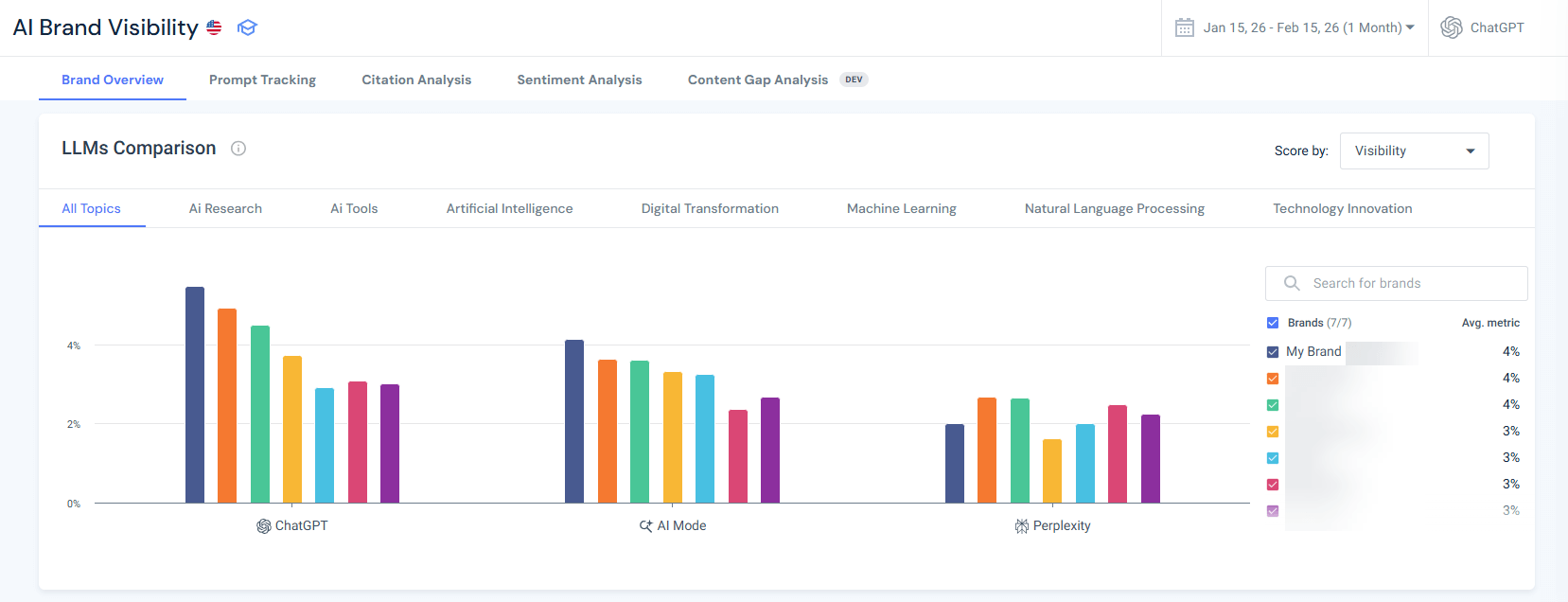
Platform-specific metrics Similarweb provides:
If you’d like to learn more, our comprehensive guide on tracking AI visibility walks you through the complete measurement process across all major platforms.
Multi-platform analysis reveals:
Diagnosis:
Different platforms have different ranking factors. Compare LLMs citation patterns, then act.
Strategy adjustment:
Different AI engines weigh factors differently:
Content optimized for maximum Copilot citations might underperform on Perplexity. Similarweb reveals these platform-specific patterns so you can optimize strategically rather than blindly.
The uncomfortable truth: If you optimize exclusively for Bing AI Performance, you might succeed at getting more Bing citations while simultaneously losing visibility on platforms that drive 10x the traffic. You need cross-platform data to avoid this trap.
The problem: Bing shows only YOUR citation data. You have zero visibility into how competitors perform.
As I tell my team, this is like running a race blindfolded. You know you ran 2,450 meters, but you don’t know if that’s enough to win, places you in the middle of the pack, or leaves you dead last.
Critical questions you cannot answer with Bing alone:
The “no context” problem:
“2,450 citations last month” is a number without meaning. It could indicate:
Bing doesn’t tell you which scenario you’re in.
This is one of the core capabilities we built at Similarweb specifically for this gap. We knew publishers needed competitive context, not just their own metrics.
Similarweb provides competitive AI visibility benchmarking, so you can perform AI citation gap analysis and measure your performance in context:
Bing AI Performance shows that your site has 2,450 citations for enterprise SaaS security topics.
Similarweb AI Search Intelligence shows you:
Diagnosis questions to investigate:
The critical insight: You cannot build an effective GEO strategy without understanding the competitive landscape. Similarweb transforms Bing’s single-player metrics into multi-player competitive intelligence.
The problem: Bing treats all citations equally. One citation = one citation, regardless of context, prominence, or sentiment.
In reality, citation context dramatically affects value:
All five examples above count as exactly one citation each in Bing AI Performance.
Why this matters:
Scenario A: High citations + negative sentiment = reputational damage
Your outdated content is cited frequently, but with qualifying phrases like “no longer recommended” or “outdated approach”. You’re visible but undermining your authority (brand damage compounds over time).
Scenario B: High citations + supplementary mentions = visibility without authority
You’re listed among 10 other sources consistently, you have presence but not prominence. Traffic potential is low because users don’t associate you with expertise.
Scenario C: Low citations + primary source framing = quality over quantity
Fewer citations, but you’re consistently framed as the authoritative expert. You have strong brand positioning, and get more traffic per citation because of the authority halo.
Bing can’t distinguish between these scenarios.
You might see 347 citations for a page and think it’s performing excellently when actually 40% of those citations include negative framing that damages your brand.
Similarweb provides sentiment analysis for citations and mentions in AI:
Learn more about how to perform sentiment analysis in our dedicated guide.
Your /api-security-guide page has 347 citations in Bing AI Performance (the top-performing URL on your site). Looks great.
Similarweb sentiment analysis shows: 89 positive citations (26%), 203 neutral citations (59%), and 55 negative citations (16%)
16% negative sentiment is a red flag. Your high citation volume is partially undermining your authority.
Deep dive investigation:
You review sample negative citations and find common themes:
Diagnosis: Content became technically outdated. AI systems still cite you (high citation count) but increasingly with negative framing (degrading sentiment).
Action required: Urgent content refresh, not optimization for more citations. You don’t need more visibility, you need to fix the quality issues causing negative sentiment.
The strategic shift: Stop optimizing for maximum citations. Start optimizing for maximum high-quality, positive-sentiment, primary-source citations.
Similarweb’s sentiment analytics transforms Bing’s quantity metrics into quality-adjusted performance measurement.
The problem: Bing displays grounding queries as a linear list. You can’t see topical relationships, semantic connections, or authority distribution patterns.
When you export 200 grounding queries from Bing, you get an alphabetical or chronological list. You can manually read through, trying to identify patterns, but there’s no visualization of:
Why this matters: Strategic content decisions require understanding topical authority at scale. You can’t manually analyze 200+ grounding queries and identify strategic patterns.
Strategic blind spots without topic clustering:
This is one of my favorite Similarweb features because it transforms unusable lists into strategic territory maps.
Similarweb provides visual topic cluster mapping and semantic analysis:
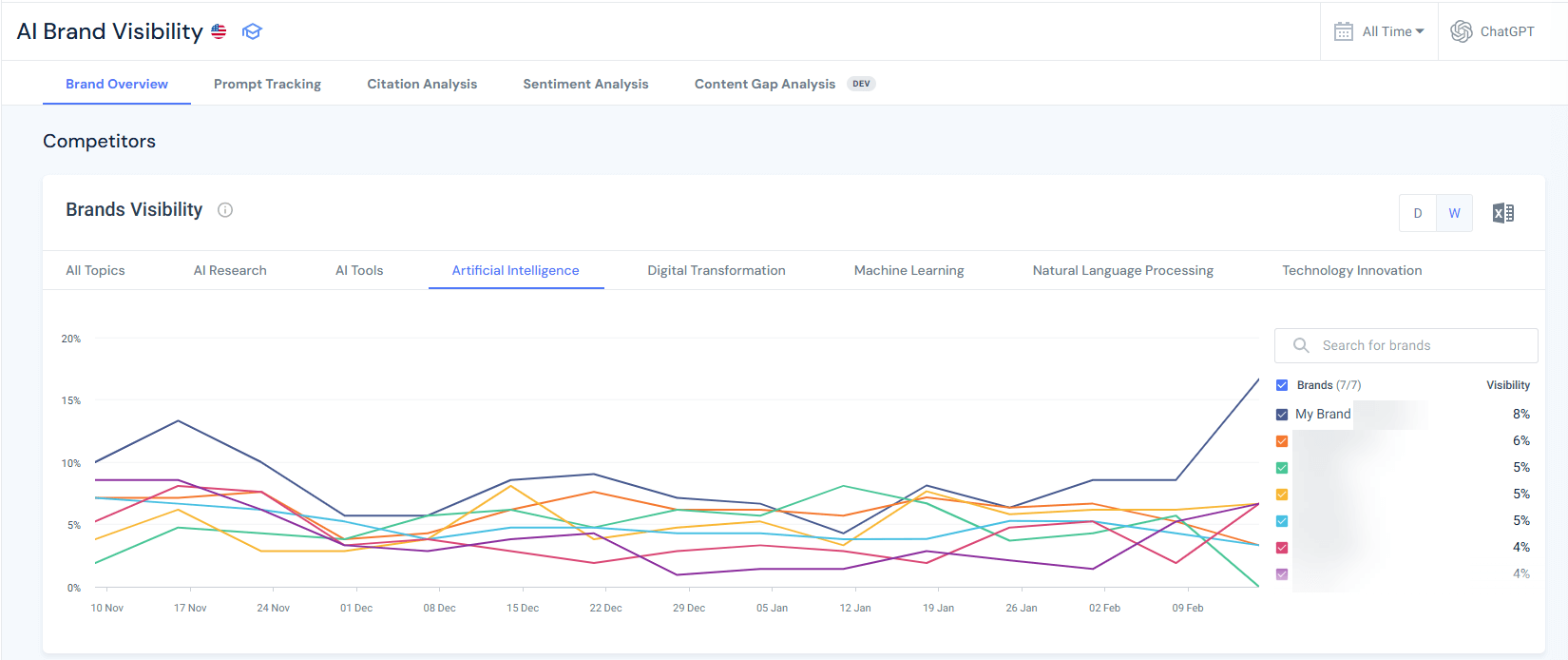
For step-by-step instructions on how this analysis works, see our AI citation analysis guide.
The strategic shift: Stop thinking in individual keywords or queries. Think in topic clusters and semantic authority territories. Similarweb’s clustering turns Bing’s linear query list into strategic territory maps.
The problem: As a public preview feature, AI Performance has limited historical data (30-90 days maximum). You can’t conduct meaningful trend analysis, identify seasonal patterns, or measure long-term strategic success.
Why this matters:
The “short memory” problem:
With only 30-90 days of data:
Similarweb provides longer-term historical AI citation and visibility data:
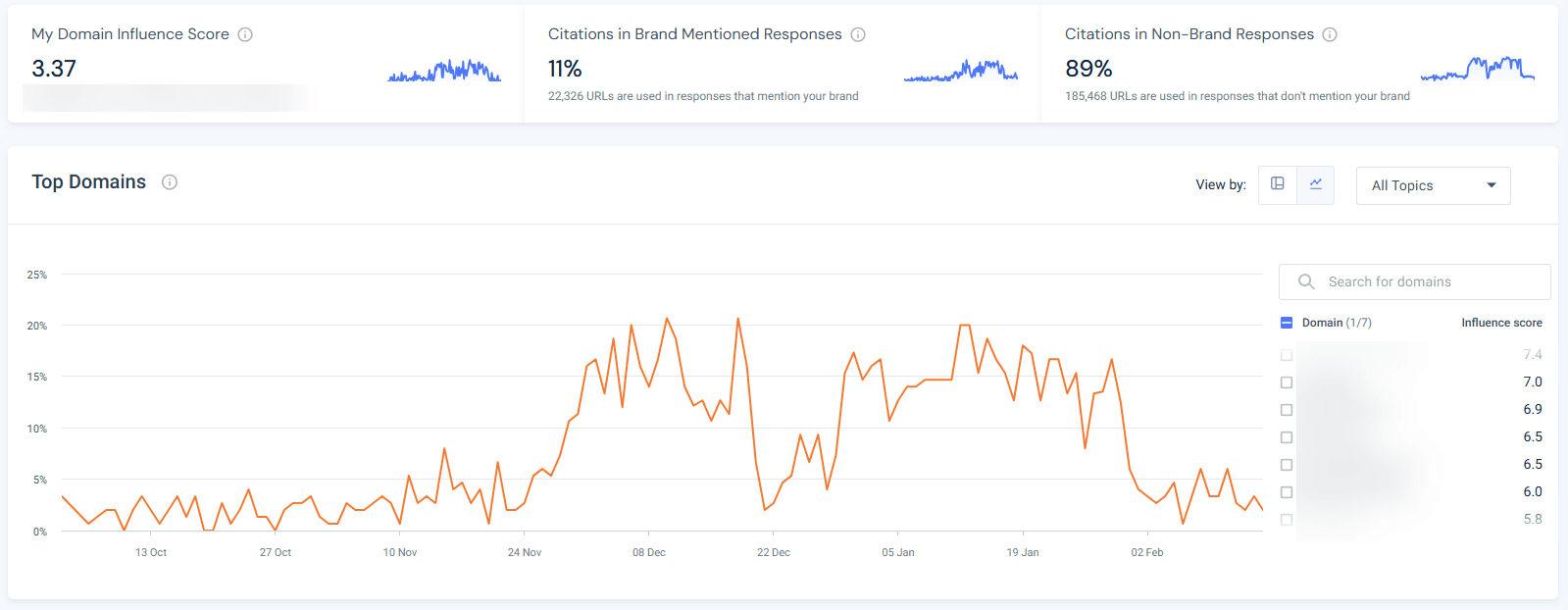
Historical citation analysis shows patterns that are invisible in Bing’s 90-day window:
Q1 2024: 890 citations
Q2 2024: 1,150 citations (+29%)
Q3 2024: 1,680 citations (+46%)
Q4 2024: 3,140 citations (+87%) ← Spike!
Q1 2025: 1,190 citations (-62%) ← Crash!
Q2 2025: 1,580 citations (+33%)
Q3 2025: 2,340 citations (+48%)
Q4 2025: 4,250 citations (+82%) ← Spike!
Q1 2026: 1,650 citations (-61%) ← Crash!
Pattern identified: Your AI citations spike dramatically every Q4 (October-December), then crash in Q1 (January-March).
Seasonal diagnosis: Investigate Q4 spike topics.
Insight: Your content is highly relevant for year-end planning, annual reviews, and Q4 budget decisions. Citations naturally spike during annual security assessments.
Without historical data, you might misinterpret:
The uncomfortable reality: Without 18+ months of data, you’re making strategic decisions based on incomplete information. Similarweb’s historical data provides the context that Bing’s public preview can’t yet offer.
During public preview, there’s no API access to AI Performance data. Fabrice Canel from Microsoft confirmed on X that “enabling data in our API is on our backlog,” but provided no timeline.
Impact: You can’t automate reporting, integrate with other analytics tools, or build custom dashboards. Everything is manual.
Similarweb provides an MCP server and full API access to AI Search Intelligence data, enabling automated reporting, analytics integration, and scalable measurement infrastructure.
API capabilities:
Weekly Automated GEO Report Pipeline:
Monday 12:00 AM:
Monday 12:30 AM:
Monday 1:00 AM:
Integration use cases:
Scenario: You manage 15 brand sites across 8 markets.
Bing’s manual approach:
Similarweb’s API approach:
The uncomfortable reality: At enterprise scale, Bing’s manual-only dashboard doesn’t scale.
Managing multiple sites, brands, or markets requires automation. Similarweb’s MCP server and API turn GEO measurement from unsustainable manual labor into a scalable intelligence infrastructure.
Microsoft explicitly states that grounding queries represent “a sample of overall citation activity.” They haven’t disclosed what percentage of queries are shown or how complete the sample is.
This introduces risk: You might optimize based on incomplete query data and miss important grounding phrases that don’t appear in your sample.
Similarweb provides comprehensive query and prompt analysis across all AI platforms.
What comprehensive prompts and query data includes:
Example scenario: Competitor analyzed Bing’s sample (12 queries), saw “API security best practices” mentioned, invested $50K in comprehensive content targeting that phrase.
Similarweb shows that the prompt drives only 34 citations/month across all platforms. Meanwhile, “API security implementation checklist” drives 340 citations/month (10x more opportunity), and the competitor had zero visibility there.
Outcome: Competitor optimized for low-value query based on incomplete sample. You used comprehensive data, captured a high-value query, and gained 340 monthly citations, while the competitor gained 34. Market share shifted in your favor because you had complete information.
The uncomfortable truth: Sampling creates false confidence. You think you understand the query landscape because Bing showed you 12 queries. In reality, you’re seeing 3-5% of the total opportunity and making strategic decisions based on potentially unrepresentative samples.
Similarweb’s comprehensive prompt analytics eliminates that risk and reveals the complete opportunity space for accurate prioritization.
Now let’s see all features and gaps side by side:
Now that you understand all seven gaps, here’s how the three platforms stack up against each other. This is the honest assessment of what each tool provides:
| Feature | Bing AI Performance | Google Search Console | Similarweb |
|---|---|---|---|
| Dedicated AI dashboard | ✅ Yes – separate section | ❌ No – mixed with standard performance | ✅ Yes – Gen AI Intelligence suite |
| Citation-style tracking | ✅ Yes – counts by URL | ❌ No – only impressions/clicks | ✅ Yes – citation frequency + prominence |
| Grounding queries | ✅ Yes – sample provided | ❌ No | ✅ Yes – full query analysis |
| Page-level AI metrics | ✅ Yes – citations per URL | ⚠️ Limited – AI impressions aggregated | ✅ Yes – URL-level citations |
| Trend visualization | ✅ Yes – dedicated timeline | ⚠️ Partial – within standard reports | ✅ Yes – historical trends |
| AI surfaces covered | Microsoft ecosystem only | Google AI Overviews only | ChatGPT, Perplexity, Gemini, Copilot, Google |
| Click data from AI | ❌ No | ✅ Yes – AI Overview clicks tracked | ✅ Yes – traffic by AI platform |
| API access | ❌ Not yet | ✅ Yes – via standard API | ✅ Yes – full API access |
| Competitive intelligence | ❌ No | ❌ No | ✅ Yes – competitor benchmarking |
| Citation sentiment | ❌ No | ❌ No | ✅ Yes – positive/neutral/negative |
| Citation prominence | ❌ No | ❌ No | ✅ Yes – primary vs supplementary |
| Intent classification | ❌ No | ❌ No | ✅ Yes |
| Topic clustering | ❌ No | ❌ No | ✅ Yes – visual cluster maps |
| Historical data | ⚠️ Limited (90 days) | ✅ Yes (16 months) | ✅ Yes (12-36+ months) |
| Cross-platform view | ❌ No | ❌ No | ✅ Yes – unified dashboard |
| Traffic attribution | ❌ No | ✅ Yes (Google only) | ✅ Yes – all AI platforms |
| Cost | Free | Free | Free Trial, 99$/month after |
I’ll give Microsoft credit for shipping what Google hasn’t: dedicated AI citation analytics. The AI Performance dashboard in Bing Webmaster Tools is the first time any major platform has acknowledged that AI visibility needs first-class measurement infrastructure.
What’s still missing (and as someone working in this space daily, I notice these gaps constantly):
Bing AI Performance gives you visibility into what AI systems are doing with your content. But it can’t tell you if that matters for your business.
That’s where Similarweb becomes essential. Similarweb shows you:
Similarweb’s AI optimization tools are becoming critical for strategic positioning: Measure cross-platform performance, benchmark against competitors, prove ROI to stakeholders, and identify opportunity gaps.
Use Bing for an added layer of tactical optimization: Discover new queries, validate page-level improvements, and track Microsoft ecosystem citations.
The future of search is increasingly AI-mediated. The tools to measure and optimize for that future are available.
Don’t theorize. Measure.
What is Bing AI Performance in Webmaster Tools?
Bing AI Performance is a dedicated dashboard in Bing Webmaster Tools that shows how often your content is cited in AI-generated answers across Microsoft Copilot, Bing Chat, and partner integrations.
It tracks 5 core metrics: total citations, average cited pages, grounding queries, page-level citation activity, and visibility trends, providing the first measurable data for Generative Engine Optimization.
What are grounding queries, and why do they matter?
Grounding queries are the internal retrieval phrases AI systems use to find your content, NOT the actual questions users ask. These queries reveal what AI systems think your content is about, helping you identify topic expansion opportunities and semantic positioning gaps.
How is Bing AI Performance different from Google Search Console?
Bing provides a dedicated AI Performance dashboard with citation-style tracking, grounding queries, and page-level citation counts, while Google mixes AI Overviews data with standard search performance reporting.
Bing focuses on citation frequency without click data, whereas Google tracks AI Overview clicks but lacks grounding queries or dedicated AI trend visualizations. Neither provides complete AI visibility, making both valuable for comprehensive measurement.
Does Bing AI Performance show click-through data from AI citations?
No. Bing AI Performance currently shows citation frequency but not clicks or traffic from AI answers to your site. This is the dashboard’s most significant limitation. Microsoft has not announced official plans to add click data.
Should I use Bing AI Performance if most of my traffic comes from Google?
Yes. While Bing has single-digit market share, it’s establishing the measurement baseline for GEO that will likely become industry standard. The tool provides free metrics, helps you understand what makes content citation-worthy, and reveals optimization patterns applicable across all AI platforms.
Why are my pages indexed but not getting any AI citations?
Pages indexed but not cited typically lack citation-worthy structure. no clear headings, missing data tables or FAQ sections, thin content under 800 words, no evidence or examples, outdated information, or missing schema markup.
AI systems need scannable structure, authoritative data, and semantic clarity to cite content confidently. Optimize these elements first before creating new content.
What does “average cited pages” mean in Bing AI Performance?
Average cited pages shows the daily average number of unique URLs from your site that Microsoft’s AI systems reference. If the metric shows 23, it means AI cited 23 different pages daily on average. High numbers indicate broad topical authority across your content; low numbers suggest concentrated authority in a few pages.
How do I access the Bing AI Performance dashboard?
Navigate to bing.com/webmasters/aiperformance and verify your site ownership via XML file upload, meta tag, or DNS verification. Once verified, the AI Performance section appears in the left navigation menu. The default view shows 30 days of citation data with adjustable date ranges.
How often should I check Bing AI Performance data?
Export citation data monthly to track long-term trends, as the dashboard only retains 30-90 days of history during public preview. Review the dashboard weekly for quick trend checks (are citations growing or declining). For urgent content refresh decisions, check specific pages daily when actively optimizing to validate impact within the 10-14 day update window.
How long does it take to see results from GEO optimization in Bing?
With IndexNow implementation, expect initial crawl within 3-7 days and AI Performance data updates within 10-14 days after optimization. Without IndexNow, the timeline extends to 1-4 weeks for crawling plus 2-3 weeks for AI re-evaluation. Full optimization impact typically takes 2-4 weeks minimum, potentially 6-8 weeks for complete visibility.
What if I have zero citations in Bing AI Performance?
Zero citations typically indicate that your site is unverified or blocked, that your pages are not indexed, or that your content is poorly structured for AI. Verify site ownership, check robots.txt settings, then audit content structure and schema markup.
Director of SEO & AI Search at Similarweb
Limor brings 20 years of expertise in SEO and AI Search. She thrives on solving complex problems, creating scalable strategies, and building amazing dashboards.
Give it a try or talk to our insights team — don’t worry, it’s free!