



Does Schema Markup Help You Get Cited By AI?
by Maayan Zohar Basteker7 Min.
Oct 25, 2026
AI citation outreach, the off-page side of AI search optimization, means using citation data to find the third-party pages AI answers rely on, then asking the publisher for a specific, accurate change. With Similarweb MCP, Claude, Manus, and many other AI tools can pull, sort, and score that data for you. Once you trust the data, you just review the results and send the pitches.
The reason to act is simple: most of what AI cites about a SaaS brand lives on other people’s pages, so optimizing your own site for AI search covers only a small share of the picture. Across 15 SaaS brand ecosystems, third-party sources made up 84% to 93% of citation weight in ChatGPT and Google AI Mode, according to Aleyda Solis’s benchmark. In B2B SaaS, I treat third-party pages as the main channel for AI visibility, not an extra.
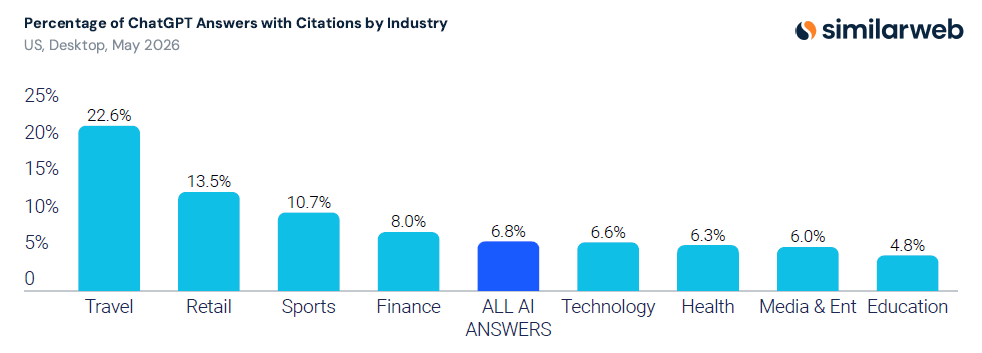
Citations are also becoming more common, which matters to anyone practicing AI SEO. The share of ChatGPT answers that include web citations grew more than 5X between June 2025 and May 2026, to 6.8% overall and 6.6% in Technology, according to Similarweb’s 2026 Generative AI Landscape report.
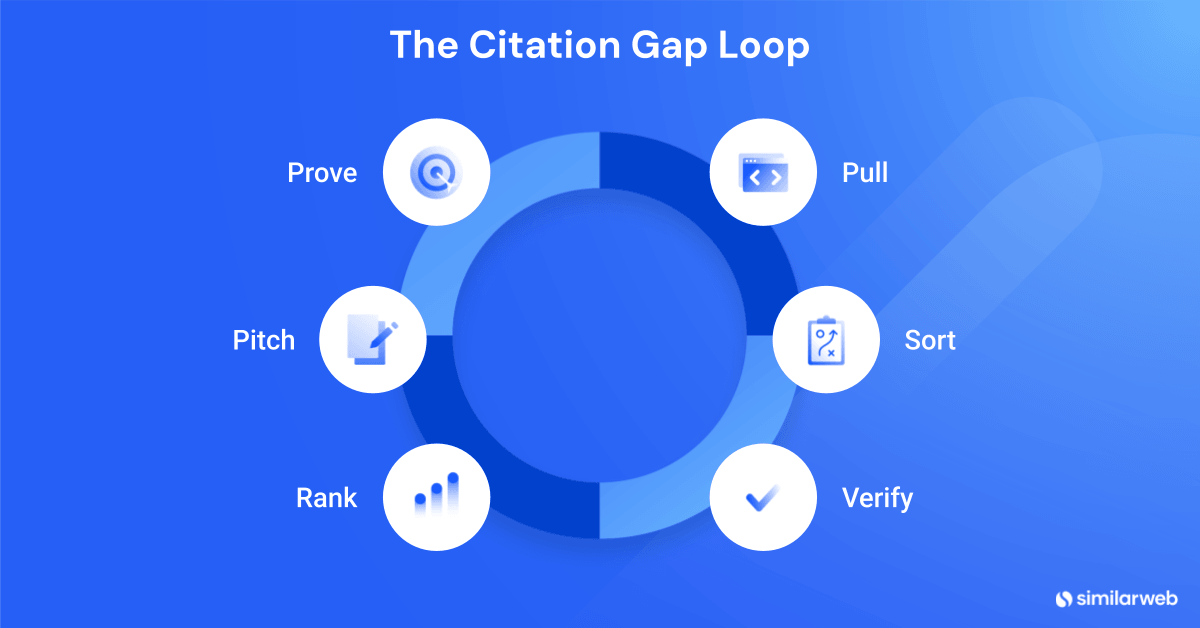
This article covers five types of outreach opportunities in your citation data, a six-step weekly workflow called the Citation Gap Loop that you can schedule to run automatically, a score for ranking targets, and the pitches and tracker that finish the job. The workflow section has paste-ready prompts for the data steps, which you can run in Claude with Similarweb MCP. The examples use one B2B brand tracked on ChatGPT and Google AI Mode, compared week over week.
Key takeaways:
AI citation outreach is the part of AI search optimization that happens off your site. It’s a slightly different tactic from link building in where targets come from (cited pages in your citation data, not authority metrics) and in how it is judged (mentions in tracked prompts, not links acquired).
Writing the email is easy. The hard part is choosing which of several hundred cited pages deserves one.
Aleyda Solis’s benchmark makes a related point. One accurate placement on a comparison page AI often reuses is worth more than broad coverage on many low-impact pages. Correcting how you appear on that page matters as much as appearing on it.
The right targets also depend on the large language model (LLM). In the same benchmark, technology publications made up 7.7% of ChatGPT’s external evidence but 0.5% of Google AI Mode’s. Review platforms made up 6.4% of ChatGPT’s external evidence and 2.8% of Google AI Mode’s.
To show the same split, I chose a campaign in Similarweb’s AI Brand Visibility tool that tracks monday.com on ChatGPT and Google AI Mode in the US. These are its citation counts by domain in the week of October 14 to 20, 2026:
| Domain | Citations in ChatGPT | Citations in Google AI Mode |
|---|---|---|
| thedigitalprojectmanager.com | 51 | – |
| techradar.com | 45 | – |
| capterra.com | 35 | 5 |
| g2.com | 28 | 8 |
| zapier.com | 31 | 35 |
| reddit.com | – | 59 |
| google.com | – | 289 |
A dash means the domain was not among LLM’s 30 most-cited domains that week.
If you pull data for one LLM and pitch as if it covered all of them, you may spend effort on pages the other platforms ignore. I pull each LLM separately, because in this campaign a combined number hid every target. Perplexity covered only about 7 responses that week, which is too few to read, so the examples use ChatGPT and Google AI Mode.
| Link building | AI citation outreach | |
|---|---|---|
| Starting point | A page you want to rank | A tracked prompt set where competitors are named and you are not |
| Target selection | Domain authority and topical relevance | Cited pages ranked by citations, prompt reach, and competitor gap |
| Typical request | A link to your page | One specific edit: add an entry, correct a fact, refresh a price. A link is optional |
| Success metric | Referring domains, rankings, referral traffic | Brand visibility and citation presence on the tracked prompts, week over week |
| Cadence | Monthly batches | Weekly pull. Pitch when a signal holds for two weeks in a row |
| Common failure | Links on pages no one reads | Pitching pages that AI cited once and never again |
Some teams call the overlap citation link building or AI link building: earning a link on a page that AI already cites. A link can result from the request, but it is not the goal. Do not confuse it with local business citation building.
Run both activities, but keep separate trackers. Link building supports classic SEO, while AI citation outreach supports AI search optimization, so the two serve different goals. The same publisher can appear in both, and one tracker would hide which program is working. Similarweb’s backlink analytics covers the link building side.
If you already run link building outreach, you can reuse your contact process and templates. Only the target list changes.
Before your next outreach batch, tag each target as coming from citation data or from an authority list. The success metric above depends on the difference between mentions and citations. For the details, see AI mentions vs. AI citations.
AI citation outreach opportunities fall into five types: pages cited where competitors appear and you do not, citations you lost since last week, answers that name you without citing you, cited pages that describe you wrongly, and rising sources worth reaching early. Each type needs a different request, so sort the export before you pitch anyone.
| Opportunity type | The request |
|---|---|
| Competitor-cited gap | Add your entry |
| Lost citation | Restore or refresh your entry |
| Mentioned, not cited | Build a page that earns the citation |
| Misrepresented page | Make one correction |
| Rising source | Get in early |
Take the prompt “What are the differences between collaboration and project management tools?” It ran once a day on ChatGPT and on Google AI Mode in the AI Brand Visibility tool between October 14 and 20, 2026. The brand tracked in that campaign is monday.com.
This is competitor citation analysis at the page level: you compare who is cited and who is named, then act on the difference.
The two LLMs gave very different answers:
| Week of Oct 14 to 20 | ChatGPT | Google AI Mode |
|---|---|---|
| Brand visibility on this prompt | 14% (named on 1 of 7 days) | 57% (named on 4 of 7 days) |
| Average competitor visibility | 21% | 9% |
| Days with cited pages | 7 of 7 | 2 of 7 |
| Most-cited pages | Notion blog (7 days), Kanbanchi blog (4 days), Computerworld feature (2 days) | Quire blog (2 days), Unito blog (1 day) |
No cited page appears in both lists. This is why you pull and score each LLM separately. Google AI Mode already names the brand in this prompt more often than it names competitors, so the gap there is small. In ChatGPT, the brand was named on 1 of 7 days, and it cited the target pages. For the full method behind this gap, see the guide to citation gap analysis. I start with this type: the request is one entry on a page that already exists.
Check the URL and the threshold, not just the domain. The domain-level pull flags itechguides.com: its citations across the tracked LLMs fell from 19 in the week of October 7 to 13 to 14 in the week of October 14 to 20, a 26.3% drop. That is under the 30% threshold, so it goes on a watch list instead of the outreach queue.
The same drop rule caught smartsheet.com in ChatGPT, which fell from 37 citations to 20 or fewer. Smartsheet is a direct competitor, so I exclude it before anyone pitches it.
When a real loss passes the threshold on a pitchable page, check the URL level and confirm the drop on the next weekly pull. Match the request to the page type. A roundup needs an entry, and a reporter-led feature needs an expert quote or a data point for the next update.
Treat this as a content task first. On October 17, ChatGPT named Monday in its answer to the prompt above and cited pages from Computerworld, Kanbanchi, Notion, and Wrike. On October 20, Google AI Mode named Monday and cited Quire, Quizlet, Unito, and Atlassian pages.
In both cases, the brand was named, but none of the brand’s URLs were cited.
A publisher cannot fix that. A page on your site that earns the citation can, and building it is on-site AI SEO work. The AI citation analysis guide explains how to build one. I treat these as a content backlog first, then an outreach list.
Open the page and count. The Unito blog post lists five tools and names monday.com once, in passing, inside the ClickUp entry. The Computerworld feature does not name the brand at all.
Neither page states a wrong fact, so the correction request did not apply this week. The same check finds wrong facts when they exist. The verification table later in this article covers both pages.
Pricing claims are the simplest to check. The Digital Project Manager’s collaboration tools list, which ChatGPT cited twice that week, says monday.com has a free plan and starts at $9 per user per month, billed annually. Both claims match monday.com’s pricing, so no correction is needed. A page that listed different prices would be flagged.
In the week pair above, these domains gained citations:
| LLM | Domain | Oct 7 to 13 | Oct 14 to 20 |
|---|---|---|---|
| ChatGPT | techradar.com | 30 | 45 (+50%) |
| ChatGPT | g2.com | 16 | 28 (+75%) |
| Google AI Mode | reddit.com | 42 | 59 (+40.5%) |
| Google AI Mode | zapier.com | 20 | 35 (+75%) |
One week of gains is a watch item, not a trend. Add these domains to a list and confirm on the next pull. Note which LLM each gain is in. techradar.com and g2.com are rising in ChatGPT, while Google AI Mode leans on reddit.com and zapier.com.
Three source types look like targets but are not.
| Source type | Example | Why it is not a target |
|---|---|---|
| Competitor-hosted pages | The Notion blog post cited on 7 of 7 days by ChatGPT for the prompt above. help.asana.com rose from 118 to 149 weekly ChatGPT citations | Written to favor the competitor |
| Government and standards bodies | ftc.gov: 20 ChatGPT citations in the latest week | Not reachable |
| Vendor documentation and search pages | learn.microsoft.com: 115 ChatGPT citations. google.com: 289 Google AI Mode citations | Not pitchable |
These pages still show what content to build. They just do not belong in the outreach queue. A government site will not add you to its list, no matter how polite the email.
The Citation Gap Loop has six steps. Similarweb MCP and Claude can do most of the work: pulling cited URLs, sorting them, reading the pages, scoring targets, finding contacts, and drafting the email. Run it on a weekly schedule to refresh your report without anyone pasting a prompt. You review the results and send the pitches.
| Step | What happens | Who does it | Tool used |
|---|---|---|---|
| 1. Pull | Get the cited domains and cited URLs for the latest 7 days and the prior 7 days, one pull per LLM | Claude, using Similarweb MCP | Cited domains report, cited URLs report |
| 2. Sort | Tag each URL by opportunity type and drop sources you cannot pitch, using the source category | Claude, using Similarweb MCP | None extra. The source category comes with the step 1 reports |
| 3. Verify | Open each page, count brand appearances, note position, check its claims against your brand facts, and classify the page | Claude reads the pages, you review | Claude’s web access to open the pages |
| 4. Rank | Count the days each page was cited and the days your brand was named, add publisher traffic, and score with the Outreach Priority Score (OPS) | Claude, using Similarweb MCP | Daily answers report, website traffic report |
| 5. Pitch | Find the contact, then send one edit per email with the supporting detail | Claude finds the contact in Similarweb Sales Intelligence, with the page byline as fallback, and drafts the email. You send it | Contact search, contact enrichment |
| 6. Prove | Pull each week again and log the first week the page and brand appear together | Claude, using Similarweb MCP | The step 1 reports, plus the brand visibility report |
The exact Similarweb MCP tool names, which you will need for the prompts below:
| In plain words | Exact tool name |
|---|---|
| List your campaigns | get-gen-ai-campaigns |
| Cited domains report | get-citations-domains-agg |
| Cited URLs report | get-gen-ai-campaign-analysis-citations-aggregated |
| Daily answers report | get-gen-ai-campaign-analysis-prompts |
| Website traffic report | get-websites-traffic-and-engagement |
| Brand visibility report | get-gen-ai-campaign-analysis-visibility-aggregated |
| Keyword rankings report | get-keywords-latest-agg |
| Contact search | post-contact-search-contacts |
| Contact enrichment | post-contact-enrichment-contacts |
Connect the Similarweb connector in Claude. Similarweb’s Claude integration shows how, and the GEO keyword research automation guide shows the same setup for keywords.
Then ask Claude to list your AI Brand Visibility campaigns with get-gen-ai-campaigns. It returns each campaign’s ID, tracked domains, brands, competitors, LLMs, and date range. Use the campaign ID in every pull.
The pull only finds pages for the prompts you track, so the prompt set decides your whole target list. Cover two kinds: awareness prompts, where buyers explore a problem, and evaluation prompts, where they compare options, like the collaboration-tools prompt in this example. Evaluation prompts matter most for outreach, because that is where brands get compared and where adding your entry changes the answer.
Leave out prompts that contain your own brand name. They make your brand look more visible than it is and hide the pages you need to be on. Keep the set fixed for a few weeks, or week-over-week changes will reflect the prompt set and not the citations.
To find candidate prompts, see Similarweb’s guide to GEO keyword research. To decide which ones earn a permanent slot, see How To Choose Which AI Prompts Are Worth Tracking.
The Verify step can only flag a wrong or outdated claim if it knows what is right. Keep one short document of approved facts and give it to Claude with every run. Include your positioning, current pricing and plan names, the products and features you want pages to get right, your direct competitors, and any wrong claims third-party pages often repeat.
Keep it to one page. A long file slows the run and makes it harder for Claude to tell which fact matters. Update it whenever pricing or plan names change, because a stale file produces false corrections. In the scoring prompt, [BRAND_FACTS] stands for that file.
This is the instruction I paste into Claude. Add your campaign ID and dates.
For campaign [CAMPAIGN_ID], call get-citations-domains-agg once for each LLM in [LLM_LIST] (llms filter), for [CURRENT_WEEK_START] to [CURRENT_WEEK_END] and again for [PREVIOUS_WEEK_START] to [PREVIOUS_WEEK_END], sorted by citation_count, limit 100. Return one table per LLM with domain, source_category, citations in each week, absolute change, and percent change. Exclude source_category “Direct Competitors”. Flag any domain whose prior-week count was 10 or more and fell by 30% or more.
In this campaign, each prompt runs once a day per LLM. A page cited for one prompt can therefore reach at most 7 citations a week in each LLM, or 14 across ChatGPT and Google AI Mode.
Read citation_count together with prompt_count. Otherwise, a page cited every day for one prompt will look weaker than a page cited twice across ten prompts.
Steps 2 to 4 use two more prompts. The next section defines the Outreach Priority Score and the feasibility scale they mention. The first pulls URL-level data for each flagged domain and sorts it:
For each flagged domain, call get-gen-ai-campaign-analysis-citations-aggregated with the domain filter for both weeks, limit 25. Return URL, citations and prompt_count in each week. Tag each URL: Lost citation (prior week 10 or more, down 30% or more), Rising source (up two weeks running), or Watch. Exclude government, academic, and vendor documentation domains.
The second scores the pages that remain:
For the top 25 tagged URLs, call get-gen-ai-campaign-analysis-prompts for the current week with metrics prompt, brands_mentioned, citations, once for each LLM. Count how many days each URL was cited and how many of those days my brand was named. Call get-websites-traffic-and-engagement weekly for each domain.
Open each page, count my brand’s appearances, classify the page, and set source feasibility from the scale. Compare each page’s claims about my brand with [BRAND_FACTS] and quote any claim that differs. List any page you could not open. Compute the Outreach Priority Score with weights 30, 20, 25, 15, 10.
For each target, set Link to add from the My Domain pages for the same topic, using get-gen-ai-campaign-analysis-citations-aggregated on the tracked domain for both weeks. Prefer a page cited this week that also appears in get-keywords-latest-agg for the topic’s main keyword, with clicks, position, and top_url. A page cited last week but not this week is also eligible, even if it does not rank. If no page qualifies, use the closest one and write “unverified” next to it.
For step 6, run the first prompt again, moving both windows forward by 7 days. Then call get-gen-ai-campaign-analysis-visibility-aggregated to log brand visibility for the same week.
Once the prompts work, schedule them. The pull, sort, and score steps need no judgment, so they can run without you and update your report each week. Claude can also read the top pages and classify them. You review the results and send the pitches.
You have three options:
Other tools that support MCP and scheduling can run the same prompts.
Filter by source category, then verify what is left. The categories in the export are broad, so use them as a first cut, not a final answer.
| Source category | Pitchable? | Example in the campaign | What to do |
|---|---|---|---|
| Direct Competitors | No | clickup.com, atlassian.com | Exclude from outreach. Keep for gap analysis |
| News & Publishers | Depends on page type | thedigitalprojectmanager.com, computerworld.com | Roundups: pitch an entry. Features: offer expert input. Government and standards pages: exclude |
| Reviews & UGC | Yes, through profiles and threads | capterra.com, g2.com, reddit.com | Complete the profile. Fix category and pricing details. Take part in relevant threads |
| Business Services, vendor and niche blogs | Often | unito.io, kanbanchi.com | Verify, then pitch |
| Business Services, vendor documentation | No | learn.microsoft.com, help.asana.com | Exclude |
| Search & Discovery | No | google.com | Exclude |
One caution. In this campaign, vendor blogs such as unito.io and kanbanchi.com carry the same Business Services label as vendor documentation such as learn.microsoft.com. The label alone does not tell you what to do, so open the page.
Open the page, count how many times your brand appears, and classify what you find. The five labels are absent, underrepresented, outdated or inaccurate, negative, and no opportunity.
Claude can do this first pass, and you should review the results before sending any pitch. A pitch with a wrong fact is likely to be ignored. I do not send a pitch for an unverified page. One wrong fact costs me the editor’s trust.
Two pages from the collaboration prompt show the range:
| Page | LLM and days cited | Brand appearances | Classification | Request |
|---|---|---|---|---|
| Computerworld feature, published Oct 24, 2019 | ChatGPT, 2 of 7 days | 0 (it names Ryver, Basecamp, Quip, Asana, Slack, Teams, Trello, Jira, and Atlassian) | Absent, and seven years old | Ask the writer for a refresh. The same writer compared Monday with Trello and Asana in April 2020 |
| Unito blog post, last updated Feb 23, 2026 | Google AI Mode, 1 of 7 days | 1 (a passing mention in the ClickUp entry. It is not one of the five listed tools) | Underrepresented | Ask whether Monday fits a sixth entry or a mention in the comparison |
Traffic and citations do not move together. Similarweb data for these pages shows:
| Site | Weekly US visits, September 2026 | Citations for the collaboration prompt, Oct 14 to 20 |
|---|---|---|
| computerworld.com | About 39,000 | 2 |
| kanbanchi.com | About 10,100 | 4 |
| unito.io | About 4,400 | 1 |
Computerworld has about four times Kanbanchi’s traffic and half the citations. The model did not read the traffic report.
A list that starts with traffic or domain authority would rank Computerworld first and skip the page ChatGPT cited most. I keep publisher reach in the score, but I weight it low.
Similarweb’s 2026 report shows the same gap at scale. In May 2026, 65% of the URLs ChatGPT cited sat two or three folders deep, while 58.8% of ChatGPT referral traffic landed on homepages (US, desktop). Aleyda Solis, quoted in the report, describes it as “a clear disconnect” between the pages ChatGPT cites and those receiving referral traffic. Score cited pages and traffic pages separately.
The steps stay the same. The source mix changes. Similarweb’s 2026 report found that:
Retail answers also carry citations more often than technology answers: 13.5% against 6.6% of ChatGPT answers in May 2026. A retail brand therefore has more cited pages to work with.
Run the pull for each category and rewrite the feasibility scale for your sources. For an ecommerce brand, replace vendor blogs and publisher roundups with review platforms and retailer-adjacent roundups in the example above.
| When | Who | What happens |
|---|---|---|
| Monday, scheduled | Claude | Pulls both weeks for each LLM, sorts the pages, reads the top ones, scores them, and saves the report to the tracker |
| Tuesday | You | Review the report: the verification results for the top 10 pages and the new lost-citation and rising-source flags |
| Wednesday | Claude, then you | Claude finds the contacts and drafts one email per approved target. You send them |
| Friday | You | Log outcomes and send the single follow-up. The next Monday pull shows whether anything landed |
Without MCP or a scheduled task, you do the Monday and Wednesday work yourself with a manual export. The routine is the same, but it takes more of your time.
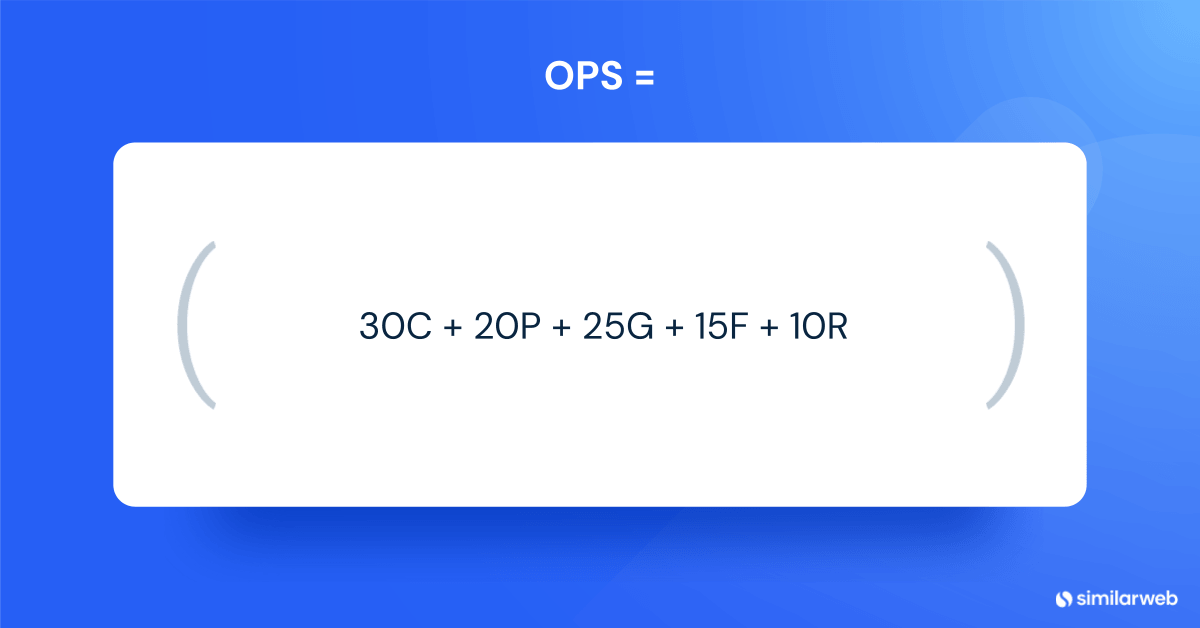
The Outreach Priority Score ranks each cited page from 0 to 100 using five inputs: citation weight, prompt reach, competitor gap, source feasibility, and publisher reach. The weights are 30, 20, 25, 15, and 10.
I put proof of influence ahead of publisher size because how often AI already cites a page counts for far more than how big the publisher’s site is.
| Input | Weight | How to compute it | Source |
|---|---|---|---|
| Citation weight | 30 | Citations in the latest 7 days ÷ highest citations in your set | citation_count |
| Prompt reach | 20 | Distinct prompts citing the page ÷ highest in the set | prompt_count |
| Competitor gap | 25 | Share of cited days on which your brand was not named in the answer | get-gen-ai-campaign-analysis-prompts, brands_mentioned |
| Source feasibility | 15 | 1.0 verified independent editorial page, 0.8 verified vendor or niche blog, 0.6 unverified page, 0.4 reporter-led trend feature, 0 excluded source | Verification step |
| Publisher reach | 10 | Weekly visits ÷ highest in the set. No data, scores 0 | get-websites-traffic-and-engagement |
| Page | C (citations) | P (prompts) | G (gap) | F | R (weekly visits) | Score |
|---|---|---|---|---|---|---|
| kanbanchi.com blog post | 4 of 4 = 30.0 | 1 of 1 = 20.0 | 3 of 4 days = 18.75 | 0.6 = 9.0 | about 10,100 = 2.57 | 80.3 |
| Computerworld feature | 2 of 4 = 15.0 | 1 of 1 = 20.0 | 1 of 2 days = 12.5 | 1.0 = 15.0 | about 39,000 = 10.0 | 72.5 |
| Unito blog post | 1 of 4 = 7.5 | 1 of 1 = 20.0 | 0 of 1 days = 0.0 | 0.8 = 12.0 | about 4,400 = 1.12 | 40.6 |
How to read this table:
Two rules apply on top of the score:
An effective citation outreach pitch asks for one specific, verifiable edit, such as adding an entry, correcting a fact, or refreshing a price, and offers the supporting detail ready to paste. The tracker then records the request, the date it went live, and the first weekly pull in which the page and the brand appear together.
Use Similarweb Sales Intelligence contacts first. See the contact information page for what the data covers. Claude can query it through two tools in Similarweb MCP:
In a test on computerworld.com, a search for editor titles returned contacts with available emails and accuracy scores of 90-92.
Revealing a contact uses credits in Similarweb Sales Intelligence, so reveal only the contacts you plan to pitch.
If the search returns no one useful, fall back to the page. The byline or author page usually names the writer or editor, and Claude reads it when it opens the page. Claude can then look for a contact or partnerships page on the same site.
Pick the person whose job matches the page: the writer for a feature, the editor for a roundup, a partnerships or marketing contact for a vendor blog. Check the accuracy score before you send, and follow your company’s rules for using contact data in email outreach.
I lead with the edit, not with AI. A clear change to one section is easier for an editor to approve than a general request.
The citation data explains why you chose the page. I keep it out of the email.
Every pitch has the same seven parts:
Send plain text with no attachments, and keep each email under about 130 words, not counting the pasted text. Claude fills the placeholders from the page and your brand facts. You review the opening line before sending.
Each email needs three tracker fields:
Owner (the sender’s name and title, such as “Dana Lee, head of content”) and Brand stay the same for every email. Claude reads the page at the URL and fills in everything else.
Here are three templates, one for each opportunity type, and a follow-up for all of them.
Subject: Draft entry for [page title]
Hi [Contact],
I’m [Owner] at [Brand]. I read [page title], especially [one specific detail].
It compares [number] [products] and was last reviewed on [date]. [Brand] is not in it.
Could you add it to the [section] section, linked to [Link to add]? Here is a draft entry in your format, ready to paste:
[Draft entry, 60 to 80 words: what the brand is and who it suits]
If [Brand] does not fit your criteria, no problem.
Thanks,
[Owner]
[Brand]
Subject: One correction on [page title]
Hi [Contact],
I’m [Owner] at [Brand]. Your [page title] says “[exact claim]” in the [section] section.
Our [pricing or product] page shows [correct fact] ([Link to add]), last updated on [date]. Here is a corrected line you can use: “[Corrected sentence, in the page’s own style]”
Thanks for keeping the page accurate for your readers. I also have [one related fact] for the same answer, and I can send it if it is useful.
Best,
[Owner]
[Brand]
Subject: New data for your [article title]
Hi [Contact],
I’m [Owner] at [Brand]. I read your piece on [topic], especially the point that [specific point].
Since it ran, [one new data point] ([Link to add]) shows [what changed]. If you update the article, I can send the full figure, the method, and a two-line quote from [expert, title] that you can use or edit.
Would that help with a refresh? If it does not fit, no problem.
Thanks,
[Owner]
[Brand]
Subject: Re: [original subject]
Hi [Contact],
Following up on my note about [the one edit, in a few words]. The [draft entry, corrected line, or figure] is in my first email, and I can resend it in whatever format suits you. If someone else looks after this page, could you point me to them?
Thanks,
[Owner]
[Brand]
Follow up once, four days after the first email. Close the item after the next weekly pull. Do not add false urgency, and do not put a list of five requests in a first email.
Decide before outreach starts. Common options are:
Log every offer next to the target in the tracker. Later, you can see which requests cost money and which didn’t. I start with the first three and treat a paid placement as the last option.
Use one row per cited page and update it every week. The core columns are below. Together they work as an AI citation tracker for outreach targets.
| Column | Purpose |
|---|---|
| URL, domain | Identify the page |
| Opportunity type | One of the five types |
| LLMs citing | Which LLMs cited the page, since each one cites different pages |
| Citations current week, prior week | Raw counts |
| Week-over-week (WoW) change | Current minus prior, with percent change |
| Prompts citing | Reach |
| Brand named on cited days | Feeds the gap input |
| Verification status and classification | Absent, underrepresented, outdated, negative, no opportunity |
| OPS | Score from the formula in the previous section |
| Contact, owner, link to add, request, offer | Who the email is for, who sends it, which of your pages to link to, what you request, and what you offer |
| Pitch sent, follow-up, outcome, live date | Pipeline dates |
| First pull with page cited and brand named | The proof |
The dashboard needs the five numbers that show whether outreach is working:
You do not need to build the dashboard by hand. Claude can build a designed HTML dashboard that opens with the data, ends with ranked actions, and updates weekly. Run this after the pull and scoring prompts, in the same conversation, so Claude has this week’s results:
Build a one-page HTML dashboard for AI citation outreach on campaign [CAMPAIGN_ID], using this week’s pull results and the week before for comparison. Make it a single self-contained HTML file I can open in a browser. Use dark navy (#092540) for text, bright blue (#195AFE) as the main accent, orange (#FF7A1A) for highlights and actions, and light grey (#F7F7F8) for the page background. Use DM Sans or Arial, and support dark mode.
Open with five key metrics: targets by pipeline stage, placements live, brand visibility on the prompt set against the baseline, the share of the top 10 scored targets contacted, and the median days from pitch to live. Color the numbers that need attention. Then show the ranked targets with status chips, brand visibility by LLM, and week-over-week citation movement.
Finish with a “What to do this week” panel of 3 to 5 ranked actions, each tagged Pitch, Check first, or Watch. Base them on these rules: pitch the highest-scored verified pages first, check unverified pages before pitching, flag lost citations (prior week 10 or more, down 30% or more, confirmed on the next pull), and put one-week gains on a watch list.
Save the data behind the dashboard in a tracker spreadsheet: each week’s pull results and my outreach log (pitches sent, replies, and live dates).
Give the tracker and the HTML file clear names. Each Monday, after the scheduled pull finishes, add the new week’s rows to the tracker and rebuild the dashboard from the same HTML file, replacing only the data.
The dashboard opens with the data and ends with the actions, so you see the numbers before deciding what to do. The key metrics that need attention are highlighted in color. Replace [CAMPAIGN_ID] with your campaign ID. Claude creates the tracker and the HTML file, so you don’t need to name either one.
This is what it would look like:
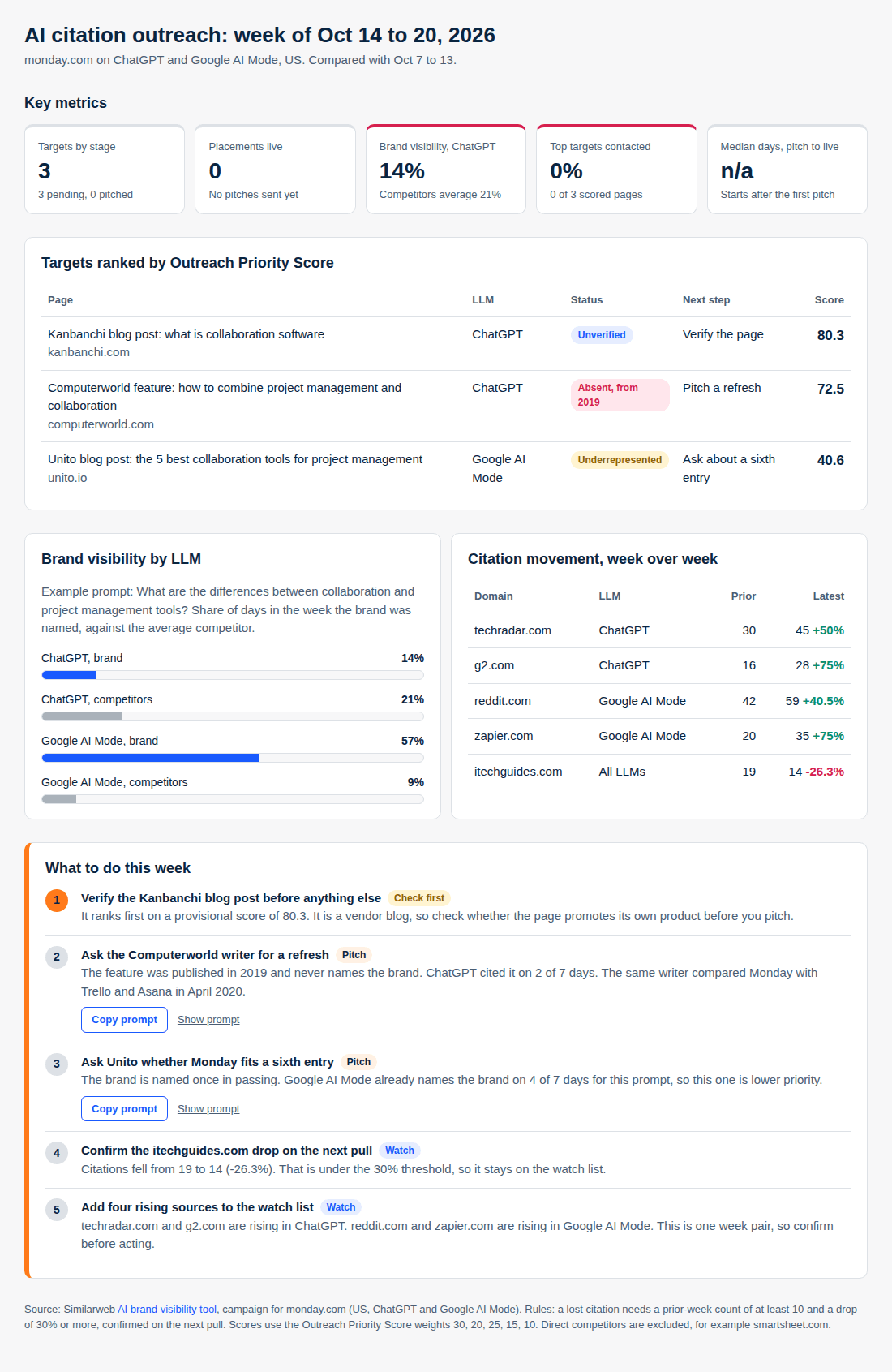
Access the live HTML here: AI Citation Outreach Dashboard Example
The refresh instruction belongs in the prompt, because an HTML file cannot call Similarweb MCP on its own. The scheduled task pulls the data, writes it to the tracker file, and rebuilds the page. The dashboard is as fresh as your last run.
This example covers one brand, one campaign, and one pair of weeks, and I haven’t sent the pitches in this workflow, so I have no outcome data. The case for placements rests on the third-party citation data above, not on measured results. Treat the scoring weights and thresholds as starting points to test.
I do not have a verified typical lag, so I will not quote one. Publishers update on their own schedule, and a model reflects a page only when it next retrieves it. The tracker measures this: days from the live date to the first weekly pull where the page is cited with your brand named.
Report the change across the whole prompt set. One page moving one prompt is not a result.
AI citation outreach works best as a weekly routine. Pull the week for each LLM, sort the opportunities, check the pages, score them, send one edit per email, and read the next pull.
Your citation data already shows which pages AI relies on, so you do not have to guess which publishers matter. It also gives your wider AI search optimization program a weekly number to report: brand visibility on your tracked prompts.
The collaboration prompt shows why each LLM needs its own pull: a single-LLM pull would have shown only half the picture.
To run the first pull on your own domain, use Similarweb MCP and Similarweb’s AI citation analytics. They return the cited URLs and domains per prompt that this workflow starts from. Then review the results and send the pitches.
Citation outreach, also written AI citation outreach, uses citation data to find the third-party pages AI answers cite, then asks publishers for a specific, accurate change. Citation link building is the narrower version, where the goal is a link on such a page. Citation outreach is one tactic within AI search optimization and is judged by brand visibility on tracked prompts, so a link is optional.
Connect the Similarweb connector in Claude and list your campaigns. Run the cited domains and cited URLs reports for the latest 7 days and the prior 7 days, once per LLM. Add the daily answers and website traffic reports, then let Claude read the top pages. Save the prompts as a weekly scheduled task so the report refreshes itself.
No. Link building starts from the pages you want to rank and measures links and traffic, while citation outreach starts from the pages AI cites and measures brand visibility on tracked prompts. Aleyda Solis’s benchmark found third-party sources carry 84% to 93% of citation weight for SaaS brands, so both programs often reach the same publishers.
Track a fixed set of prompts, then pull the cited URLs and domains for the latest 7 days and the prior 7 days, one LLM at a time. Rank them by citation count and prompt count, remove sources you cannot pitch, and read the rest. In the example campaign, ChatGPT and Google AI Mode cited entirely different pages for the same prompt.
Compare the same URL across two weekly windows and flag pages that had at least 10 citations in the prior week and fell by 30% or more. Confirm the drop on the next pull before acting. In the example campaign, itechguides.com fell from 19 to 14 citations (-26.3%), so it stayed on the watch list.
Each LLM cites different pages, so combining them hides your targets. For the same prompt in the example campaign, ChatGPT named the brand on 1 of 7 days and Google AI Mode on 4 of 7, and no cited page appeared in both lists. Score each LLM on its own, then merge the targets.
Track brand visibility on your prompt set every week, and log the first week a pitched page is cited with your brand named. Report the change across the whole prompt set against a baseline, not one page or one prompt. The tracker records the pitch date, the live date, and that first pull.
There is no reliable benchmark, because it depends on how fast the publisher updates the page and when the model next retrieves it. Measure it instead. Log the date each edit goes live and the first weekly pull in which the page is cited with your brand named, then report the median across placements.
Not for listings. A page hosted by a direct competitor is written to favor that competitor, so an inclusion request is unlikely to go anywhere. Treat it as a signal of what content to build on your own site. Independent roundups and review sites are better targets, though you may want to correct a competitor’s site if it states a wrong fact about you.
Director of SEO & AI Search at Similarweb
Limor brings 20 years of expertise in SEO and AI Search. She thrives on solving complex problems, creating scalable strategies, and building amazing dashboards.
Does Schema Markup Help You Get Cited By AI?

AI Search Optimization: Tips, Best Practices, and Techniques That Worked in 2026

Dark Funnel Metrics: What to Measure When Buyers Decide Before They Click
Give it a try or talk to our insights team — don’t worry, it’s free!